Brute forcing device passwords

When working with IoT and embedded systems, brute-force password guessing attacks are an effective tool to gain access. Over the years, I’ve learned some tips and tricks to make these attacks more effective.

What is brute forcing?

Very simply, it’s guessing passwords so that you can find a valid one and login to the device.

It’s often referred to as “password cracking”.

Online vs offline brute forcing

There are two forms of brute-force attack.

One is online. This means you are actively trying to login to the device using the web interface, telnet, SSH, or local console. This has disadvantages. It’s generally quite slow (less than 10 attempts per second, sometimes much slower) and account lockout is a challenge.

The other is offline. This is when you have the hash of a password and can guess passwords on an entirely separate machine. This has advantages. For many types of hash, hundreds of thousands of guesses can be performed each second. But, you need to have the hash in the first place.

(you can read a bit about hashes in an earlier post here)

If I have the device in front of me, and I can risk destroying it, I will generally obtain the hash and perform an offline attack. This isn’t always appropriate though – sometimes devices are too expensive or you cannot risk breaking it.

Sometimes the device has strong physical protections that make obtaining hashes difficult.

Often, an online attack can be setup and carried out in seconds – all you need is network access and a list of passwords. It’s often wise to try this first.

Do I need the password?

If your goal is to gain access to a device in front of you, make sure you have considered other paths.

Devices frequently have vulnerabilities allowing bypass of passwords. Command injection via web interfaces is still very common.

If you can modify the firmware, consider running an unauthenticated telnet shell. Or replace the password hash with one of your own, avoiding the existing password entirely.

What is the goal of getting the password?

With physical access to a device, time, and some skill, it is nearly always possible to login to a device without knowing any passwords.

So why do we want to find out the password?

Firstly, it’s very common to find hardcoded or default passwords on embedded systems. If you can find the password from one device, you can use it on many others. I call these BORE attacks – Break Once, Run Everywhere. The password has much higher value than just the device in front of you.

Secondly, you can perform a high-risk attack against a device on the bench, obtain a password, and then use that password in the real-world. This was what we did on an oil rig, where an attack was developed against a Siemens switch in the lab, and then the attack used on the rig itself.

Thirdly, it’s often possible to quickly and easily obtain a password hash from one device using something like the Cisco Password Recovery mode. You can quickly reset a Cisco switch on an non-critical, physically exposed switch, brute force the password, and then find that same password is in use on the core network.

How much effort are you willing to expend?

Obviously, the longer you spend guessing passwords, the more passwords you can guess.

Online brute force attacks are extremely rate-limited. The workload can be divided up by attacking multiple devices, but if you can obtain multiple devices, why not get the hashes from one of them and move to an offline brute force attack?

Offline brute force attacks cost in processor time. The more computing power and time spent, the more attempts you can make. You can literally throw processor time (and hence money) at the problem!

Depending on the value of the password, you may be willing to spend different amounts. A hardcoded root password for an IoT lightbulb behind NAT has a lot less value than the root password on a maritime satellite router with Internet exposed SSH!

Online attacks

There are three common network services which allow online brute force attacks to be carried out: Web interfaces, telnet and SSH.

A tool called hydra comes in very useful here. It handles these protocols and many more.

SSH is the easiest to deal with. Nearly all devices have a standard response, and the protocol feeds back if you have authenticated successfully or not.

Telnet is a bit awkward. The password prompt, and the feedback you get if you successfully login varies from device to device. Often you need to write scripts to do this properly. Always make sure you catch the success message properly – I once left a script running against a device for an entire weekend and it had found the password in less than 10 minutes.

Web interfaces can be easy sometimes, and incredibly challenging at others. The easiest are ones using HTTP Basic or Digest authentication – this is when you get the pop-up password Window in your browser. This can be easily attacked. Web forms take more effort – generally you need to intercept traffic and work out how the password is being sent. Some devices use JavaScript and other complex authentication flows that take significant effort to reverse engineer and replicate. An intercepting proxy such as Burp or Zap can be of use here.

If the device has account lockout, preventing you trying more than a few passwords, it is always worth checking that this persists through a device reset. It is very common for devices like DVRs to lockout for 15 minutes after 5 wrong guesses, but if you restart the device, the lockout has gone. A USB or WiFi-connected socket can be scripted to restart the device automatically.

Just be warned: a lot of ICS equipment responds badly to brute force attacks. Lockups and restarts are common, and I’ve even caused the relay output on one device to change state.

Cracking rigs

Calculating password hashes requires processor power. The first common password cracking tool, John the Ripper, made use of the main CPU in a machine.

It turns out that graphics cards are far more efficient at calculating most types of hash. Another password cracking tool, hashcat, became available, making use of multiple graphics cards. This hugely accelerated the rate at which passwords could be guessed, but required significant investment in hardware, and ongoing electricity and cooling costs.

Then cloud computing happened. It’s now possible to rent machines with graphics cards in them and perform password cracking in the cloud. You can spin up as many machines as required and use tools to split the workload amongst them. This can be very helpful when you do not know how often you need to perform password brute force attacks.

Picking your passwords

There are several common methods to generate lists of passwords to attack devices.

A dictionary attack takes a pre-generated list of words and tries them all. There are many readily available password dictionaries of varying quality, some contain millions of passwords. These dictionaries can be very effective against large sets of hashes, such as those from a website breach or Windows Active Directory.

Building your own dictionary based on the vendor and product can help. The tool CeWL can spider a website and return a list of words for use in password attacks.

A brute force or incremental attack tries all possible combinations. With these attacks, the character set used and the length of the password become important. The more characters tried and the longer the password, the larger the search space becomes and the longer an exhaustive search will take.

Most passwords consist of upper and lower case letters, numbers, and possibly symbols. The more of these that are used, the larger the search space.

  • 26 lower case
  • 26 upper case
  • 10 numbers
  • 10 common symbols
  • 20 relatively common symbols

So, if the password contains lower/upper/number/common symbols, there are 72 possible characters.

If the password is 8 characters long, this results in 72^8 possible passwords. This is 7.22e14 – a very large number.

It’s at this point that we need to consider how quickly we can guess passwords. This is highly dependent on the hash algorithm used. For a typical high-end hashcat rig, the following are approximate rates.

AlgorithmGuesses per second
MD5200,000,000,000
descrypt7,290,000,000
md5crypt80,000,000
bcrypt105,000

There is a huge variation here. This can dictate what kind of attack is viable. With our 72^8 attack above, the length of time for an exhaustive search for the above algorithms is as follows:

AlgorithmTime
MD51 hour
descrypt1 day
md5crypt105 days
bcrypt218 years

On average, the password will be found in half that time. 30 minutes vs over 100 years! It’s clear that brute-force is not a viable attack for bcrypt. For md5crypt, as long as you know the password is in that space, 105 days may be a reasonable expense depending on the value of that password.

This is also why it is key to understand the password complexity. descrypt only hashes the first 8 characters of the password. Combined with the speed at which we can guess, it makes exhaustive searches possible.

Let’s see what changing the character set does to the times if md5crypt is used.

Character setOptionsTime
lower/upper527 days
lower/upper/number6232 days
lower/upper/number/common symbol72105 days
the kitchen sink922 years

Again, there is huge variation. 7 days is likely viable, but it is a big risk assuming that no number of symbols were used. Equally, 2 years is a long time to spend to find a password and there is still a chance they used some quirky symbol and you never find the password.

Always keep in mind the language of the developers. It’s rare to find umlauts in US and UK passwords, but don’t assume that for a product developed in Germany.

And what about the password length changing? Again, with md5crypt and 72 characters.

Password lengthTime
8105 days
101500 years
128 million years
14Yeah.

It becomes obvious that if the password is longer, plain brute force attacks quickly become useless.

Hashcat also has other modes of operation that are more refined.

Mask attack mode takes a pattern and then applies a brute force attack within those limits. It’s very common to find that certain vendors, companies and users follow certain patterns, such as using iwhd7262, baid8621. Mask attack mode can be very helpful here.

This is also a good mode for things like passwords based on serial numbers and MAC addresses.

One of the most powerful modes is the rules mode. This takes a series of different rules and applies them to a list of passwords. This can be things like changing the case, appending numbers, swapping letter for numbers (i->1 a->4). There are complex sets of rules published, all of which can be very effective.

Open Source Intelligence

It is always worthwhile researching the vendor and their other products. The one you are looking at may not have a published password, but other products could, and they may follow a pattern.

In one instance, Samsung had a hardcoded root password across many of their cameras. Nearly all of their cameras used bcrypt, making an exhaustive search unlikely to succeed as it is so slow. However, one model of camera was using descrypt. An 8 character exhaustive search was carried out, yielding a complex (but short) password. This was found to be the same password on the device using bcrypt. With bcrypt, we would never have found the password.

Find it in other forms

Never assume that the password is only stored as a single hash on the device. It’s very common to find it hashed using different algorithms or stored in plaintext.

One device we looked at used Webmin for the web interface. This stored the passwords as descrypt, so an exhaustive 8 character search was started. This quickly gave up the passwords for all accounts.

The main Linux login used bcrypt though. Exactly the same accounts existed in Webmin as for the OS. Taking a stab in the dark, we assumed that the passwords were the same for both hashes, just truncated for the descrypt one. We knew the format and character set, so launched a hybrid attack using the first part which we already knew and brute force against the bit that we didn’t. We would never have found the passwords without the first 8 characters being known.

Passwords often get stored in plaintext. Common locations for this are WiFi hotspot configurations in hostapd.conf (the WiFi password is often the same as the OS login) and setup/factory reset scripts.

Conclusion

Hopefully the above tips and tricks have helped you understand password brute force attacks so that you can effectively use them against devices.


Why is unauthenticated encryption insecure?

Cryptography is a complex subject. There are many subtle issues that can be introduced if you don’t know what you are doing.

There is a common mantra: “don’t roll your own crypto”. This is because both inexperienced and experienced developers frequently build cryptographic systems that are insecure.

However, there has to be a line – when does it start becoming “rolling your own”? Particularly in embedded systems, there are times when custom protocols need to be used, and developers stray into the dangerous area of cryptography.

One of the most common mistakes we have seen is the use of unauthenticated encryption.

What is encryption?

Encryption is encoding a plaintext into a ciphertext using a key, with the goal of keeping the plaintext confidential.

Only someone with the correct key should be able to decrypt the ciphertext and turn it back into plaintext.

Encryption provides confidentiality. It stops someone working out what the message is.

So what’s the issue?

An attacker can modify the ciphertext and cause the plaintext to change. There is no inherent means in encryption to detect this change.

Encryption does not provide authenticity. You cannot check that the message is genuine and has not been tampered with.

What can an attacker do with this?

I’m going to describe one attack against unauthenticated encryption.

Many encryption algorithms only operate on fixed-size blocks of data – they are called block ciphers. To encrypt longer lengths of data, a mode of operation is used to apply the block cipher repeatedly.

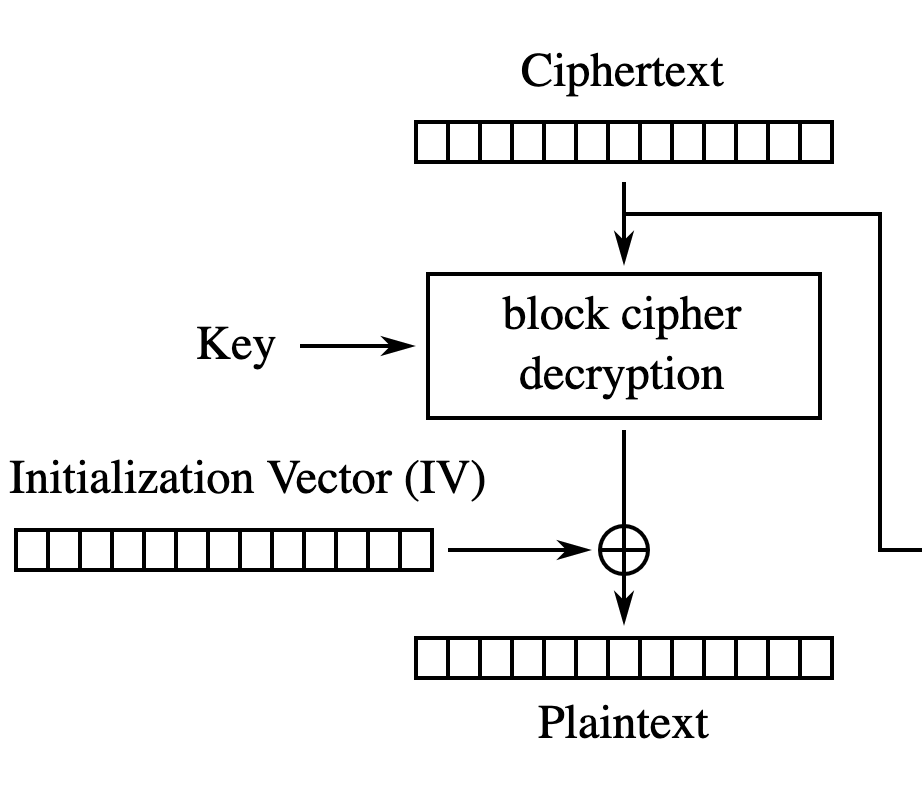
One mode of operation is called CBC (Cipher Block Chaining). When encrypting the data, the previous ciphertext block is mixed into the current plaintext block using an operation called “exclusive OR“. This is denoted with the + in a circle in diagrams.

There is also an input called the initialisation vector, or IV. This is a random input to the algorithm, and is intended to ensure that the ciphertext is different, even if the same plaintext is encrypted. This prevents leaking information about the content.

The initialisation vector is transmitted alongside the ciphertext.

Decryption is similar. The previous ciphertext block is exclusive ORed with the output of the block cipher to obtain the plaintext.

Exclusive OR is a deterministic operation. If we look at a single bit, then it operates as follows:

ABOutput
000
011
101
110

I always think of this as “if one input is high, invert the other input, otherwise leave it alone”.

The operation is carried out for each bit in a byte.

A: 0 1 0 1 1 0 0 1 (0x59)
B: 1 1 1 1 0 0 0 0 (0xF0)
O: 1 0 1 0 1 0 0 1 (0xA9)

What this means is that modifying one of the inputs to exclusive OR results in a predictable change to the output. And the operation can be easily reversed.

A: 0123456789ABCDEF
B: FFFF00FFF00F0FF0
O: FEDC459879A4C21F

If we now exclusive OR the output with one of the inputs:

A: FEDC459879A4C21F
B: FFFF00FFF00F0FF0
O: 0123456789ABCDEF

Hopefully that explains exclusive OR.

Let’s look back to how CBC uses this in decryption. In the first block, the IV is exclusive ORed with the output of the block cipher. The IV is transmitted alongside the ciphertext and an attacker can modify both at at will.

We can encrypt the string “A dog’s breakfast” using a key and the initialisation vector of all 0x00 (here on CyberChef).

Key: 0123456789ABCDEF0123456789ABCDEF
IV:  0000000000000000000000000000000
Plaintext: A dog's breakfast
Ciphertext: c7b1d96f0f520f33faaccfdc107f718aafe8892c3a29c76b0732a760a0f54f50

Of course, this can be decrypted (here on CyberChef).

If I change just one byte in the ciphertext, the entire message is corrupted (here on Cyberchef). There’s no way for me to predictably modify this plaintext by changing the ciphertext.

Key: 0123456789ABCDEF0123456789ABCDEF
IV:  0000000000000000000000000000000
Ciphertext: c7b2d96f0f520f33faaccfdc107f718aafe8892c3a29c76b0732a760a0f54f50
Plaintext: .L...Q½êU...ì7Ò.t

But the attacker also has control over the IV. Let’s set the first byte of the IV to 0xFF (here on CyberChef). Only the first byte of the plaintext has changed!

Key: 0123456789ABCDEF0123456789ABCDEF
IV:  FF00000000000000000000000000000
Ciphertext: c7b1d96f0f520f33faaccfdc107f718aafe8892c3a29c76b0732a760a0f54f50
Plaintext: ¾ dog's breakfast

And it has changed predictably. The capital A (ASCII 0x41) has been exclusive ORed with 0xFF to become 0xBE (which decodes as ¾ although it’s above the normal ASCII range).

A: 0 1 0 0 0 0 0 1 (0x41)
B: 1 1 1 1 1 1 1 1 (0xFF)
O: 1 0 1 1 1 1 1 0 (0xBE)

This is a very high level of control! The attacker can now modify the plaintext without detection. Let’s try and significantly change the meaning of it.

The original message contained “A dog’s breakfast”. Can we change this canine feast into a feline one?

We exclusive OR the original plaintext with the desired one (here on CyberChef). Notice how the output only has value for the characters we have changed.

Original: A. .d.o.g.'.s. .b.r.e.a.k.f.a.s.t.
Original: 4120646f67277320627265616b66617374
Desired:  A. .c.a.t.'.s. .b.r.e.a.k.f.a.s.t.
Desired:  4120636174277320627265616b66617374
Output:   0000070e13000000000000000000000000

Pop that output in as the IV to the decryption, and we’ve successfully changed the message (here on CyberChef). All of this without even knowing the key.

Key: 0123456789ABCDEF0123456789ABCDEF
IV:  0000070e130000000000000000000000
Ciphertext: c7b1d96f0f520f33faaccfdc107f718aafe8892c3a29c76b0732a760a0f54f50
Plaintext: A cat's breakfast

Of course, the attacker needs to have knowledge of the plaintext to make use of this attack. However, it’s extremely common for some or all of the message to be known. For example, when we visit most websites, the first part of the response will be “HTTP/1.1 200 OK”. If this was only protected by CBC encryption, we could change that to “HTTP/1.1 404 No”, changing the behaviour of the browser (here on CyberChef).

This doesn’t just impact the first block of data either. After the first block, instead of the IV, the previous ciphertext block is used in the exclusive OR operation. The attacker can modify the ciphertext and end up controlling the plaintext.

This comes at a cost though – the previous plaintext block will be totally corrupted as a result.

To illustrate this, we can encrypt a longer block of text (here on CyberChef).

Let’s change “baud” to “cats”. We need to locate the correct place in the ciphertext. AES (the encryption algorithm we are using) works in 16 byte blocks. The word “baud” is 85 characters in, so in the 6th block. We therefore want to modify the 5th block of ciphertext.

The exclusive OR is a bit more complex than last time – we now need to exclusive OR the ciphertext, the original text, and the desired text (here on CyberChef). But change those 4 bytes, and we change the word “baud” to “cats”.

The only issue is, as expected, the previous block has been entirely corrupted. Whilst in this case, it’s made part of the message nonsensical, it frequently has no impact when carrying out attacks.

But there are worse problems?

The above issue allows an attacker to modify the plaintext without detection. This would be an issue in certain situations, such as lock/unlock messages to a door.

But not authenticating your encryption can lead to worse issues. A type of attack called padding oracle attacks can let an attacker obtain the plaintext by sending a large number of specially crafted packets.

Block ciphers only operated on fixed blocks. If the data is shorter than a block, it must be padded. There are a number of ways of doing this, such as appending the number of padding bytes (e.g. 0x02 0x02 or 0x05 0x05 0x05 0x05 0x05). The process of decryption may check this padding is correct or not, and respond differently in each case.

An attacker can exploit these differential responses to leak the plaintext. This can break the confidentiality of messages.

What’s the solution to this?

Encryption should always be authenticated. There are two common solutions to this:

  • Add a Message Authentication Code (MAC). This is a keyed cryptographic checksum that provides authenticity and integrity.
  • Use an authenticated mode of operation such as GCM.

Even with this advice, there are many pitfalls. Applying the authentication and encryption in the wrong order can lead to weaknesses; this is so common that it has been deemed the Cryptographic Doom Principle.

Generally, developers shouldn’t be working with cryptography at this level unless they are suitably skilled. That’s easy to say, harder to put into action. There is a big movement to make use of secure-by-default cryptographic libraries and APIs that provide developers with useful functions without giving them so much rope they can hang themselves.

There are scant few reasons for not authenticating encryption.

Checksums, hashes, and security

If you have worked with embedded systems, you will have come across terms like checksums, hashing, password hashes, and CRCs. Whilst checksums and hashes are two distinct terms, they are often used for similar purposes. They are also often used incorrectly.

What is a checksum?

A checksum is a short piece of data derived from a longer block of data, generally for the purpose of detecting errors that have been introduced. If the checksum does not match the data, then something has gone wrong.

They can be used to ensure data integrity i.e. has this data been accidentally modified? Good checksums mean that it is highly unlikely that the data could be changed and the checksum could also be accidentally changed to be valid.

They cannot be used to ensure data authenticity i.e. has someone maliciously altered this data? If an attacker can modify the data, they can recalculate the checksum so that changes cannot been detected.

Message:  The quick brown fox jumped over the lazy dog.
Checksum: 82a34642

Message:  The quick brown cat jumped over the lazy rat.
Checksum: 0319c205

There are many common forms of checksum.

Check digits are added to numbers all around us. Credit card numbers, IMEI numbers for phones, VIN numbers on cars. These are generally designed to detect human errors, such as off-by-one (3->4) and transposition (54->45).

Parity bits are used in communications. The number of 1s in the data are counted. If it’s an even number of 1s, the parity bit is 0. If it’s an odd number of 1s, the parity bit is 1. The receiver simply needs to sum all the bits including parity together. If it’s not an even number of 1s, then an error has been introduced. Clearly this has issues – if two bits are flipped, the error may not be noticed!

Modulo checksums are used frequently in custom radio frequency protocols and wire protocols. You sum up the value of each byte sent, then perform a modulo 256 operation i.e. what’s the remainder when divided by 256.

If we want to send the following data:

45 67 AB 43 23 98 FD E1

We sum each byte to get 0x433 – too big to fit in a single byte! So we do “modulo 0x100”, leaving us with a remainder of 0x33. Generally, we take what is called the “two’s complement” (0x100 – 0x33 -> 0xCD) of that and append it. Why? Because now if we add all the bytes together and do modulo 0x100, we should get 0 if all is well.

Cyclic Redundancy Checks (CRCs) are more complex but found everywhere around us. There are hundreds of common variants, with different lengths – CRC-8, CRC-16, CRC-32 – and different “polynomials” – a set of coefficients used. Although they have all these variations and can be more challenging to reverse engineer, this does not mean they can prove data is authentic.

Keeping a Checksum the same

There are situations where an attacker cannot modify both the data and the checksum. For example, if the checksum of a firmware image is displayed on the manufacturer’s website, and the attacker wants to modify the firmware.

The issue with the checksums mentioned above is that it is nearly always possible to modify the data and keep the checksum the same.

With the modulo checksum, this is trivial. If one byte is increased by 1, another byte must be reduced by 1 to maintain the same checksum. This can be really easily shown with ASCII text. Changing a letter’s case adds or subtracts 0x20 from the value. A is 0x41, a is 0x61. 8 times 0x20 is 0x100, so change the case of 8 characters, and the modulo checksum doesn’t change!

Message:  I really like bananas very much.
Checksum: 74

Message:  I really LIKE bananas VERY much.
Checksum: 74

It’s not as easy with CRCs, but by modifying any 4 consecutive bytes in a file, the checksum can be kept at the same value. This does mean additional bytes need to be changed, but these can often be squeezed into padding or irrelevant text.

Message: I really like bananas. This bit is not important.
CRC-32:  8D00795D

Message: I really HATE bananas. This biN�`Z not important.
CRC-32:  8D00795D

What is a hash?

A hash function is a deterministic function that maps an arbitrary sized piece of data to a fixed-sized piece of data.

Technically, the checksums mentioned above are actually hash functions – you can provide any length of input to parity or a modulo checksum, and get a fixed length output.

However, in security, we are generally talking about something called a cryptographic hash function.

You will probably be familiar with some of the common ones: MD5 and SHA are the most well known.

First, I’d like to talk about one of the inherent qualities of a hash function called the pigeonhole principle. If you have 9 pigeonholes, and 10 pigeons, then at least one of the pigeonholes must contain more than 1 pigeon.

Because a hash function maps something of arbitrary length into something of fixed length, there will always be multiple inputs that result in the same output. There are infinite numbers of arbitrary length inputs, and only a finite number of outputs.

As a result, collisions exist – two different inputs that result in the same output.

An ideal cryptographic hash function should hold certain properties.

It must be deterministic – if you provide it with the same input twice, you should get the same output. This one seems fairly obvious – if the purpose of the hash function is to detect errors or similar, it must always behave the same.

password
5f4dcc3b5aa765d61d8327deb882cf99

password
5f4dcc3b5aa765d61d8327deb882cf99

It should be quick to calculate the hash. Remember how it works for arbitrary data size? You should be able to quickly hash a short sentence or the entire contents of Wikipedia.

It should be infeasible to determine a message that yields a given hash value. This is given the fancy name of “preimage resistance“.

4b6a6c37c7f8777a247fc727dbd2658d
????

It should be infeasible to determine two messages that yield the same hash value. This is given the fancy name of “collision resistance“. We know that collisions will exist, but they should not be easy to find.

A small change in the input should result in a large change in the output. This is called the “avalanche effect“. This makes sense later when we consider some of the use cases.

password
5f4dcc3b5aa765d61d8327deb882cf99

Password
dc647eb65e6711e155375218212b3964

Uses

So what do you use these cryptographic hash functions for?

Error Detection

Similar to checksums, hashes can be used to detect errors or changes in data.

Exactly as with checksums, if an attacker can modify both the data and hash, there is no way to determine if the data has been changed. Hashes are not safe against an active attacker, only accidental modification.

Most hashes have an output that is longer than a checksum. The longest commonly used checksum is CRC-32, which has a 32 bit or 4 byte output. The shortest commonly used hashes are 128 bits or 16 bytes. There are almost 8e28 more potential values for a 128 bit value compared to 32 bits.

Checksums are therefore far more prone to collisions than hashes. It is perfectly possible to find two pieces of data with the same CRC-32, but incredibly difficult to find two pieces of data with the same hash.

Due to the avalanche effect, even a single bit changing in the input should result in a completely different hash. This is different to most checksums, where changes to the input result in predictable changes to the checksum.

As such, hashes tend to be more resistant to certain attacks.

File and Data Identification

A cryptographic hash of a file or data can be used to uniquely identify it. This is often used with software or firmware update files to ensure that the file is as expected. They are also used in computer forensics to ensure that data has not changed.

Digital Signatures

To ensure that data is authentic, we make use of digital signatures. The identity of websites you visit using HTTPS is checked because it is digitally signed by a trusted certificate authority. The software installed on your PC can be signed to ensure it is genuine.

A technical limitation of digital signatures is that they can only operate on short blocks of data. It’s not possible to directly sign an entire software installer.

To sign large amounts of data, the data is first hashed. The hash is then signed instead of the data itself.

If there is a weakness in the underlying hash function, the signature cannot be trusted.

Password hashing

When you log in to most systems, you send the server your password. The server then checks that your password matches the one you have previously provided.

That sounds simple. But user databases are frequently leaked or breached. If the passwords are in the database, they can be read and then used. Because of this, passwords are not stored in their raw form. We hash the passwords instead.

Because it is difficult to determine the password that results in a given hash, or find another password that results in the same hash, the attacker cannot trivially work out what the password is.

There is still a weakness here – if you have the hash, you are free to guess the password. You can guess as many passwords as you like. This is called a brute-force attack.

An ideal cryptographic hash function is fast. This means that calculating the hash for a password would be fast. This allows many guesses to be attempted in a short period of time.

An ideal cryptographic hash function is also deterministic. This means that the same password will result in the same hash. It would be possible to precalculate the hashes for many passwords, and then simply lookup the password that corresponds to a hash.

Because of these issues, specific password hash functions exist. Common ones are bcrypt and PBKDF2.

Firstly, they increase the time taken to perform a hash. They do this by using a normal hash function many times. This makes brute-force attacks slower. The number of times this is done is configurable, allowing a balance between the time taken and resistance to brute-force.

Secondly, a random value called a salt is also input into the hash function alongside the password. This is stored alongside the hash. When the password needs to be checked, the salt is read and used with the password to calculate the hash. This means that the same password will not result in the same hash, making the precalculation of password hashes useless.

Despite these dedicated password hash functions existing, it is still common to find conventional hash functions used. It is around 2 million times faster to calculate an MD5 hash compared to bcrypt. This can be the difference between an attacker working out the password or not.

Password hashing cannot be used when the password needs to be sent to another system. For example, if an IoT lightbulb connects to your WiFi, the WiFi password cannot be stored as a hash inside the device. It must be in a recoverable form to be used to connect.

Common Mistakes

We see a lot of common mistakes made with checksums and hashes. Here are some of them.

Hashes used for Authenticity

As mentioned several times above, if an attacker can modify both the data and hash, it is not possible to detect if the data has been modified. They are not useful for providing data authenticity. This is what digital signatures are for.

It is incredibly common for a hash to be prepended to a firmware file. This does not prevent someone modifying the firmware maliciously.

We’ve even seen a product call a MD5 hash a signature.

Encrypted Checksums used for Authenticity

Data is encrypted to provide confidentiality, not authenticity. It stops someone determining the content of the message. It does not stop them modifying the message.

With most cryptographic algorithms, if you change the encrypted data, it results in random decrypted data.

If we encrypt a simple phrase:

I like cats
d621c9a199d16a93cb5d1586ccdeac29

We can then decrypt it:

d621c9a199d16a93cb5d1586ccdeac29
I like cats

But change just one bit in the encrypted data, and we get a totally unrelated output.

d621c9a199d16a93cb5d1586ccdeac28
ó^e.|.."PÃKV.6ÖÌ

This doesn’t seem useful to an attacker. But if a CRC-32 is contained inside that encrypted data, you can just provide random encrypted data until you randomly get the right CRC value in the decrypted data. This would, on average, take just over 2 billion attempts – well within the realms of possibility for an automated attack.

The root cause of this is assuming that encryption proves that data is authentic.

Weak Password Hash Functions

Despite the existence of dedicated password hash functions, it is still common to find conventional or weak hash functions used.

MD5 is millions of times faster to calculate than bcrypt. For every single password we can guess with bcrypt, we can try millions with MD5. This is a huge difference.

One of the password hash functions that can be used by Linux systems is a DES-based one, commonly known as descrypt. Whilst this was suitably slow to calculate when it was designed forty years ago, increases in processing power mean that it is not longer considered secure.

Worse still, descrypt only considers the first 8 characters of the password entered. “password” and “password&767%^%46” are handled exactly the same.

The combination of it being fast to brute-force and only supporting 8 character passwords mean that it is viable to exhaustively search all passwords in a reasonable time frame.

Only dedicated and modern password hash functions should be used.

Use of Broken Hash Functions

Due to their heavy use in digital signatures, significant effort is spent analysing the security of hash functions. Weaknesses are found in them, and then they are considered “broken”.

MD5 is very commonly used, but it is possible to find a collision in a few seconds on a laptop. A simple collision like this – two arbitrary inputs that produce the same hash – is not of much use to an attacker. But with some more effort, it is possible to find two related inputs with the same MD5 hash. This has been used in attacks the past – a certificate authority believed they were signing a conventional website certificate, but in reality, they were signing another certificate authority certificate that had the same hash value. More can be read about this here, but it is not particularly easy to follow.

A viable pre-image attack has not been found for MD5. This would allow an attacker to simply generate another message given the value of a hash. This is a much more serious attack.

Regardless, MD5 should be considered broken and no longer used. More to the point, there are more secure alternatives that can be used. No new systems should use insecure hash functions.

This site has a useful table showing how various hash functions have been broken after time. Once a collision is found, it should be considered game over. Cryptographic attacks can only improve over time, not get worse.

Conclusion

Hopefully you’ve learned about some of the uses of checksums and hashes, and the pitfalls surrounding them.

Understanding Binary and Data Representation with CyberChef

A significant part of reverse engineering and attacking devices relies on viewing and recognising data in various forms and working out how to decode it.

We typically use Linux tools and scripts to do this, but you can make the first few steps using a really neat online tool called CyberChef.

What is binary?

All data is stored as a series of 1s and 0s. A single 1 or 0 is called a bit. We call this binary because there are two values.

The next largest common unit is a byte, which is 8 bits.

Beyond this, SI prefixes are used. 1 kilobyte (kB) is technically 1000 bytes and 1 kibibyte (KiB) is 1024 bytes. However, kB is frequently used for both 1000 bytes and 1024 bytes, even in technical contexts. During most reverse engineering, kB means 1024 bytes.

UnitSize
kB (kilobyte)1024 bytes
MB (Megabyte)1048576 bytes or 1024kB
GB (Gigabyte)1073741824 or 1024MB

To determine how many possible values can be stored in a data of a given length, you do the following calculation:

Values = 2^bits

^ means “to the power of”

For example, a single byte (8 bits) can store 2^8 or 256 values. 2 bytes (16 bits) can store 2^16 or 65536 values. Increasing the bit length by 1 bit will double the number of possible values.

You can see that by the time you have reached 64 bits, there are a huge number of possible values.

BitsValues
8256
1665535
324294967296
641.84e19
1283.4e38

The number of potential values can be important when calculating the search space for performing brute-force attacks.

Although there are 256 values in a byte, the values normally start at 0. Therefore, the range is 0-255, covering all 256 values.

Binary data can encode information in many different forms. The following are all representations of the same data

  • 01000001 (binary)
  • 65 (decimal)
  • 41 (hexadecimal)
  • A (ASCII or text)
  • QQ== (base 64, a means of encoding binary as text)

What is hexadecimal? Well, instead of each digit representing 10 values (0-9 as in decimal), each digit represent 16 values (0-15). Clearly we can’t put 15 into one digit, so we use letters above 9.

HexDecimal
00
11
22
33
44
55
66
77
88
99
A10
B11
C12
D13
E14
F15

As a single hex digit represents 16 values, this is only 4 bits (2^4 = 16). To represent a byte, we need to use 2 hex digits such as D4 or 8E.

We will frequently use the prefix of 0x to represent hex i.e. 0x41. Context is everything though – never assume how data is encoded! It can be text, part of a floating point number, or code.

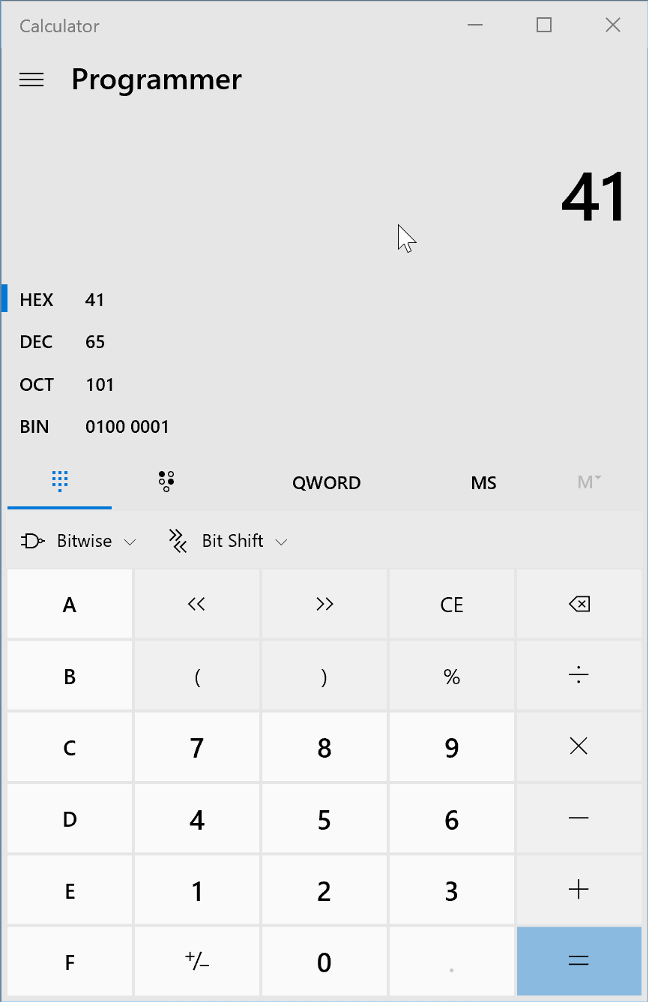
You can use the built-in calculator in Windows and OS X to convert from one to the other if you switch to programmer view:

Onto CyberChef

A useful tool for many of these understanding data is called CyberChef. This is an online tool that runs entirely in the browser. None of the data entered leaves your machine, and it can be saved and run locally.

Yes, it’s GCHQ. No, they aren’t stealing your secrets. At least not using this tool.

Multiple operations can be chained together to form a pipeline. This includes simple conversions, but also complex things such as encryption and decryption.

Let’s start my putting some text into the “Input” section. This will be copied verbatim to the “Output” section as no “Recipe” has been created.

On the list of “Operations” on the left hand side, drag “To Hex” into the “Recipe”. The output will now show a hexadecimal representation of the text.

You can search the operations using the box on the top left rather than hunt through all the subsections.


The text is encoded using a method called ASCII. Each character is represented by a single byte. In reality, only 7 of the 8 bits in the byte are used, giving 128 (2^7) possible characters.

Converting to and from ASCII is a very common task. Tables showing all the values are available online.

Ranges and values worth becoming familiar with are:

  • 0x20 – space
  • 0x30-0x39 – 0-9
  • 0x41-0x5A – A-Z
  • 0x61-0x7A – a-z

It’s very common for the value of 0x41 – capital A – to be used when performing tests for buffer overflows. You’ll start to recognise long strings of 41414141 when looking at memory!

ASCII is not the only way of encoding text. Unicode is a common format that allows many more possible characters, but there are tens of different encodings. You can use the “Text encoding” operation to see these. UTF-16LE encodes each letter as 2 bytes (the 16 means 16 bits). Now each second character looks like a “.”.

If we now add the “To hex” operation, we can see that every second byte is 0x00 – a null. Those “.” just mean “I’m not sure how to display this”.

We can flip this round and firstly take hex, convert it to binary using “From hex”, and then decode the text using “Text decode”.

You can click this link to see this directly.

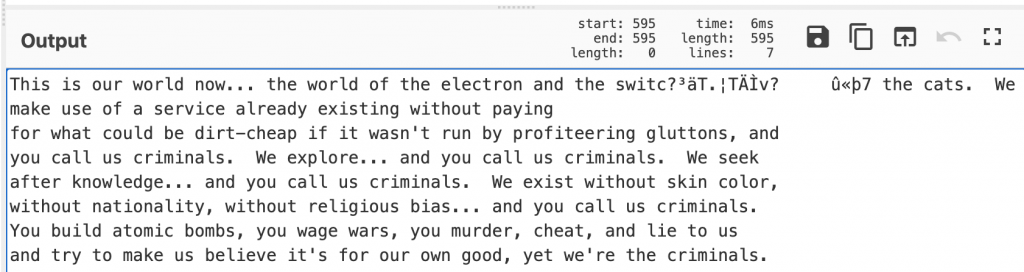
If we use the correct encoding, (UTF-16LE), then the text looks as expected. Change it to UTF-16BE though, and suddenly we have nonsense.

This is a vital point – binary data can be interpreted in many different ways. Our operating systems and programs use file extensions and metadata to determine how to handle the content, but as reverse engineers we often need to guess.

So far we have just looked at text. However, executables on our machines are also just binary data. We can load these into CyberChef and analyse them.

I have chosen to look at write.exe from C:\Windows\system32\ – it’s small enough that CyberChef can handle it but provide some interest.

You’ll immediately see some recognisable strings. Nearly all executables will have these in some form. They can be incredibly useful in reverse engineering software, allowing us to determine function, endpoints, passwords and more.

Another operation called “Strings” will filter out lengths of text longer than a certain limit. As you can see, it matches some data that is not text – this is just where binary data happens to decode as ASCII correctly.

We know that this is a Windows executable as we just read it from our own system. The .exe on the end is just part of the filename – it would still be the same binary data if it was called cheese.txt.

But frequently, we don’t actually know what a file is actually meant to do – is it an executable? A zip file? An image?

CyberChef has the operation “Detect File Type”. This fingerprints the file and gives you a best guess as to what it is. It’s not infallible, but it is helpful.

Let’s analyse a slightly longer text file of words.

Add the operation “Entropy”. What this does is look at the “randomness” of a file. By default, this uses something called Shannon entropy calculated across the whole file. Data in the middle ground has structure – it’s either text, an executable, or some other form of information.

Another useful tool to determine file content is “Frequency Distribution”. This counts how often given byte values occur across the file. Frustratingly, the lower axis in in decimal not hex, but you can see some clear spikes. The very high one – at 32 – is 0x20 or space. The cluster around 107 are lowercase characters.

Now try the same with write.exe and a zip file (>10Kbytes or so).

You’ll see that write.exe actually has entropy similar to text – despite it not being text. It has structure however and does contain some text. The frequency distribution is quite different though!

I’ve added another operation – remove null bytes – so that the huge number of 0x00 in the file are removed from the graph to make it more clear.

You can see the same “bump” around 107 – this is the text embedded inside the executable. But there is a much wider spread of values than with the text file.

The zip is a different story though. The Shannon entropy is 7.99 out of 8. It’s as random as it could be. This is nearly always a sign of compression or encryption. Nearly all compression works by spotting patterns and condensing them down – hence the structure is removed. Encrypted data should be indistinguishable from random noise.

This is a zip file – so the compression results in high entropy.

When we look at the frequency distribution, we can see a much more uniform distribution across all values. Again, a sign of compression or encryption. These are handy tools to determine what is in a file, especially firmware and the like.

To demonstrate this, you can encrypt a file using AES in Cyberchef and check the entropy and frequency distribution.

You can click this link to see the operations required.

Conclusion

I hope this introductory post helped you to understand binary and some of the tools we can use to convert, decode, and understand the purpose of various data.